<?xml version="1.0" encoding="utf-8"?><feed xmlns="http://www.w3.org/2005/Atom" xml:lang="ko"><generator uri="https://jekyllrb.com/" version="4.4.1">Jekyll</generator><link href="https://ocxeverywhere.github.io/feed.xml" rel="self" type="application/atom+xml" /><link href="https://ocxeverywhere.github.io/" rel="alternate" type="text/html" hreflang="ko" /><updated>2026-07-15T23:37:29+03:00</updated><id>https://ocxeverywhere.github.io/feed.xml</id><title type="html">LazyDaddy</title><subtitle>Independent Android and Windows apps, product stories, and engineering notes from LazyDaddy.</subtitle><author><name>LazyDaddy</name><email>ocxeverywhere@gmail.com</email></author><entry xml:lang="en"><title type="html">[App Development Journey #4] Is the Work Over When Development Is Done?</title><link href="https://ocxeverywhere.github.io/en/blog/posts/app-development-beyond-coding/" rel="alternate" type="text/html" title="[App Development Journey #4] Is the Work Over When Development Is Done?" /><published>2026-07-12T01:16:00+03:00</published><updated>2026-07-12T01:16:00+03:00</updated><id>https://ocxeverywhere.github.io/en/blog/posts/app-development-beyond-coding</id><content type="html" xml:base="https://ocxeverywhere.github.io/en/blog/posts/app-development-beyond-coding/"><![CDATA[<p>As I mentioned in the first entry in this development journey, I am a developer.</p>

<p>I am used to building the features I want, thinking about better performance, and writing clean, robust code that is easy to maintain. With Claude Code and Codex, I had fun creating two Android apps and a Windows program.</p>

<p>As a developer, I would usually have been satisfied at that point. If I put in a little more effort, I might write a friendly user manual or introduce a new feature at a seminar or user meeting. That was about it.</p>

<h2 id="the-other-world-i-found-after-development">The Other World I Found After Development</h2>

<p>But telling other people about the self-sufficient apps I had built for my own needs was an entirely different world.</p>

<p>A month or two later, my expectation that I would quickly attract hundreds or thousands of users had completely disappeared. Instead, I found myself wrestling with questions like these:</p>

<ul>
  <li>How can I get these apps in front of the public?</li>
  <li>Who actually needs them?</li>
  <li>How should I market and promote them from a business perspective?</li>
</ul>

<p>Following AI’s suggestions, I made AI-generated short videos and shared them as Instagram Reels. I am now comfortable creating short-form videos with GPT Image and Google Flow and editing them in CapCut.</p>

<p>Even so, the user base did not grow easily. Because I was targeting the Korean market first, I opened a Naver Blog and started writing. After all, when I need to find something in Korea, I still search Naver or browse Naver Cafes myself.</p>

<h2 id="promotion-was-another-series-of-trials-and-errors">Promotion Was Another Series of Trials and Errors</h2>

<p>I offer every app and program I have built for free because I still do not have a clear business model, but users have not come easily. I also created a Threads account as another way to promote them.</p>

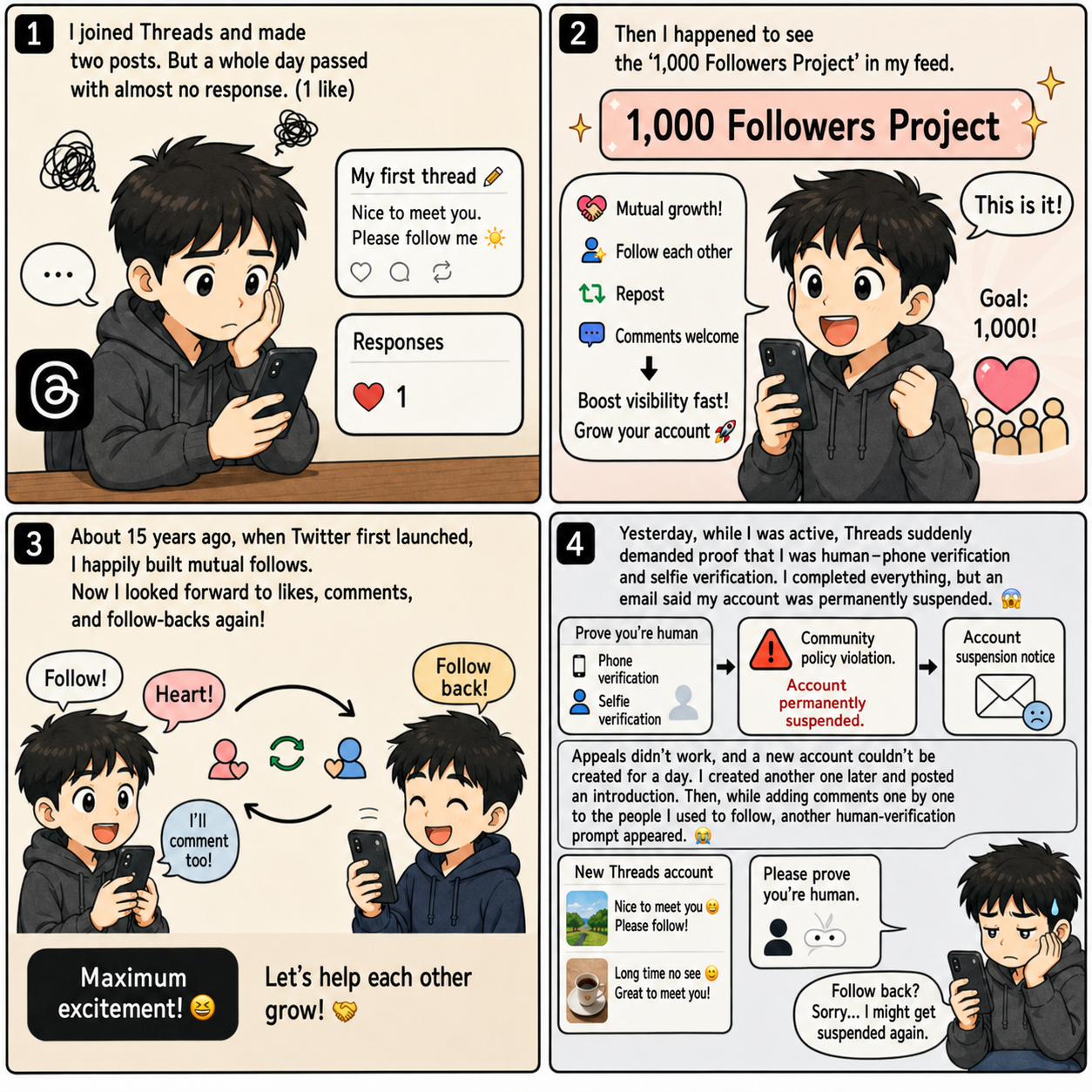
<p>Threads, however, was extremely sensitive to activity that appeared to be advertising or AI-driven. In the end, my account was permanently suspended twice. I was stopped while trying to grow my follower count before I had even managed to promote anything properly. I wrote about that experience in an earlier post.</p>

<p><a class="link-preview" href="https://blog.naver.com/lazydaddypresent0523/224335892630" target="_blank" rel="noopener noreferrer sponsored">
  <span class="link-preview__media">
    <img src="/assets/images/posts/threads-follow-back-preview-en.png" alt="English-localized preview of a Naver Blog post about my follow-for-follow experience on Threads" loading="lazy" decoding="async" />
  </span>
  <span class="link-preview__body">
    <strong>[Contains Advertising] Do You Know Follow-for-Follow on Threads?</strong>
    <span>An earlier post about the trial and error I experienced while trying to grow a following on Threads.</span>
    <small>blog.naver.com ↗</small>
  </span>
</a></p>

<h2 id="rebuilding-my-github-pages-site-for-global-search">Rebuilding My GitHub Pages Site for Global Search</h2>

<p>Naver Blog may perform well in Naver Search, but the real market for my apps and services is global. When I search Google for apps like mine, some of them do not appear at all.</p>

<p>That is why I am using Codex to update my existing GitHub Pages site, which originally served as both my developer page and app showcase.</p>

<p>First, I asked Codex to recommend three representative sites that successfully run blogs on GitHub Pages. After analyzing them and finding a theme I liked, I began adding a blog to my existing site. Or, to be precise, Codex began doing the work.</p>

<p>If you are curious about what kind of blog Codex can build on GitHub Pages, take a look at this site. It was created using only the five free hours of GPT Plus usage.</p>

<p>Of course, managing tokens this way requires preparing a web-coder skill and a worker agent based on that skill in advance. I explained the method I used in detail in an earlier post.</p>

<p><a class="link-preview" href="https://ocxeverywhere.github.io/blog/posts/claude-code-token-management/" target="_blank" rel="noopener noreferrer">
  <span class="link-preview__media">
    <img src="/assets/img/social/default-card.png" alt="LazyDaddy app development blog post about managing Claude Code token usage" loading="lazy" decoding="async" />
  </span>
  <span class="link-preview__body">
    <strong>[App Development Journey #2] Claude Code — Managing Token Usage</strong>
    <span>How I manage AI coding tokens through model selection, agents, testing, and review.</span>
    <small>ocxeverywhere.github.io ↗</small>
  </span>
</a></p>

<p><a class="link-preview" href="https://ocxeverywhere.github.io/" target="_blank" rel="noopener noreferrer">
  <span class="link-preview__media">
    <img src="/assets/img/social/default-card.png" alt="LazyDaddy apps and development blog homepage" loading="lazy" decoding="async" />
  </span>
  <span class="link-preview__body">
    <strong>LazyDaddy</strong>
    <span>Android and Windows apps that reduce small, repetitive tasks in everyday life, along with notes from their development.</span>
    <small>ocxeverywhere.github.io ↗</small>
  </span>
</a></p>

<h2 id="i-still-have-more-questions-than-answers">I Still Have More Questions Than Answers</h2>

<p>I have also learned that WordPress would be much better in many respects for a full-scale blog. But I do not need a full-scale operation yet. For the same reason, I do not plan to register a separate domain, which would cost about $20 a year, for the time being. I do not need Google Ads or other advertising either.</p>

<p>I still have no idea which direction these apps will take or which customers’ problems and needs they will eventually solve.</p>

<p>Only now do I feel that I am beginning to understand business. I am learning the importance of planning, the role of marketing, and even the uncomfortable truth that a feature a developer finds interesting—or adds simply because it can be built—may be completely useless to users.</p>

<p>As I thought through these questions, read books, and searched for YouTubers who had gone through similar experiences, I learned that even reaching 100 app installs is genuinely difficult.</p>

<p>This is probably not just a problem for today’s AI-assisted solo developers. It is closer to the fundamental nature of business—an area I had never needed or wanted to understand before.</p>

<p>In the end, if I want to run a business, I need to understand business. I still have a mountain to learn.</p>

<p>Even so, I feel incredibly fortunate that AI can accelerate not only development but all of these other areas as well, helping me move through trial and error much faster.</p>

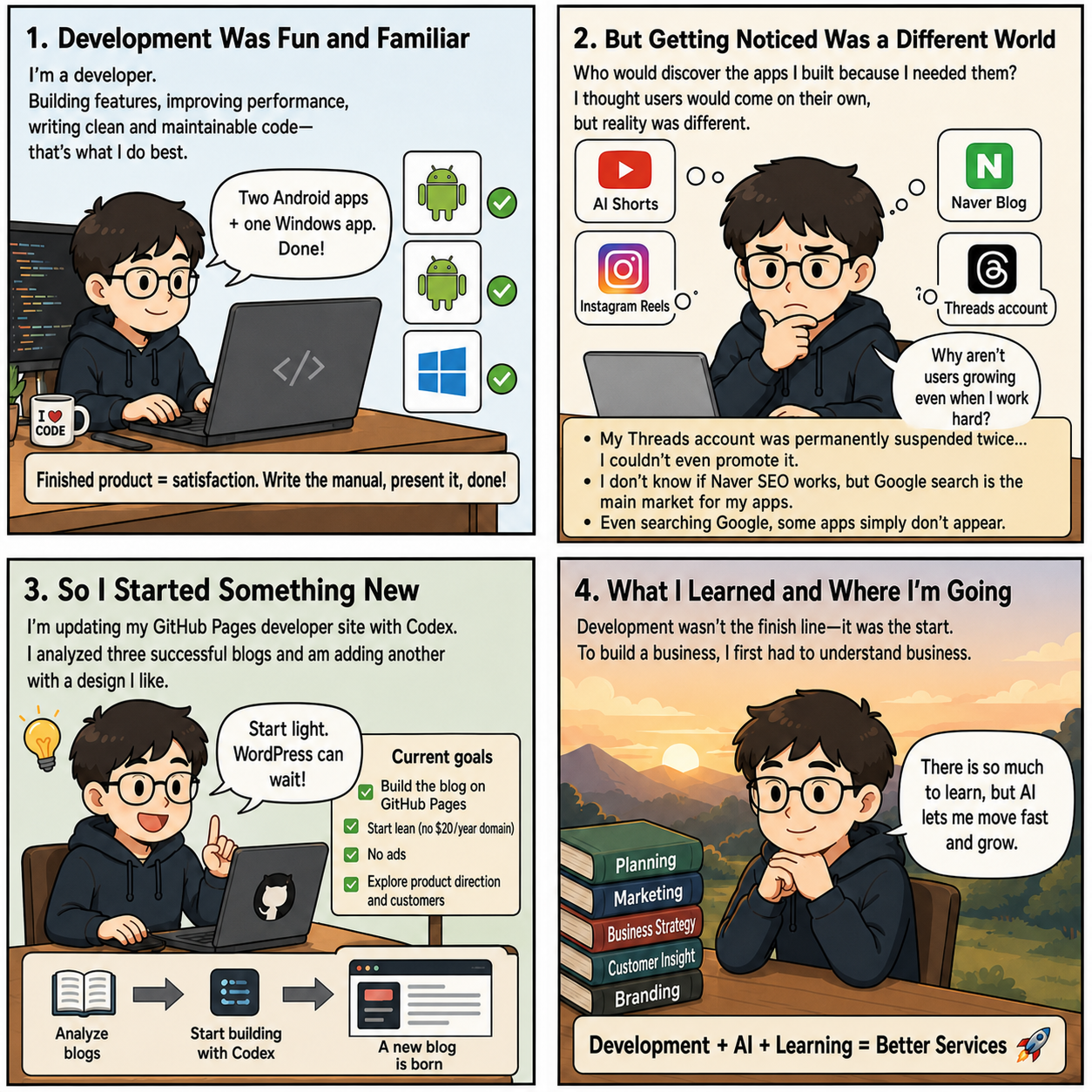
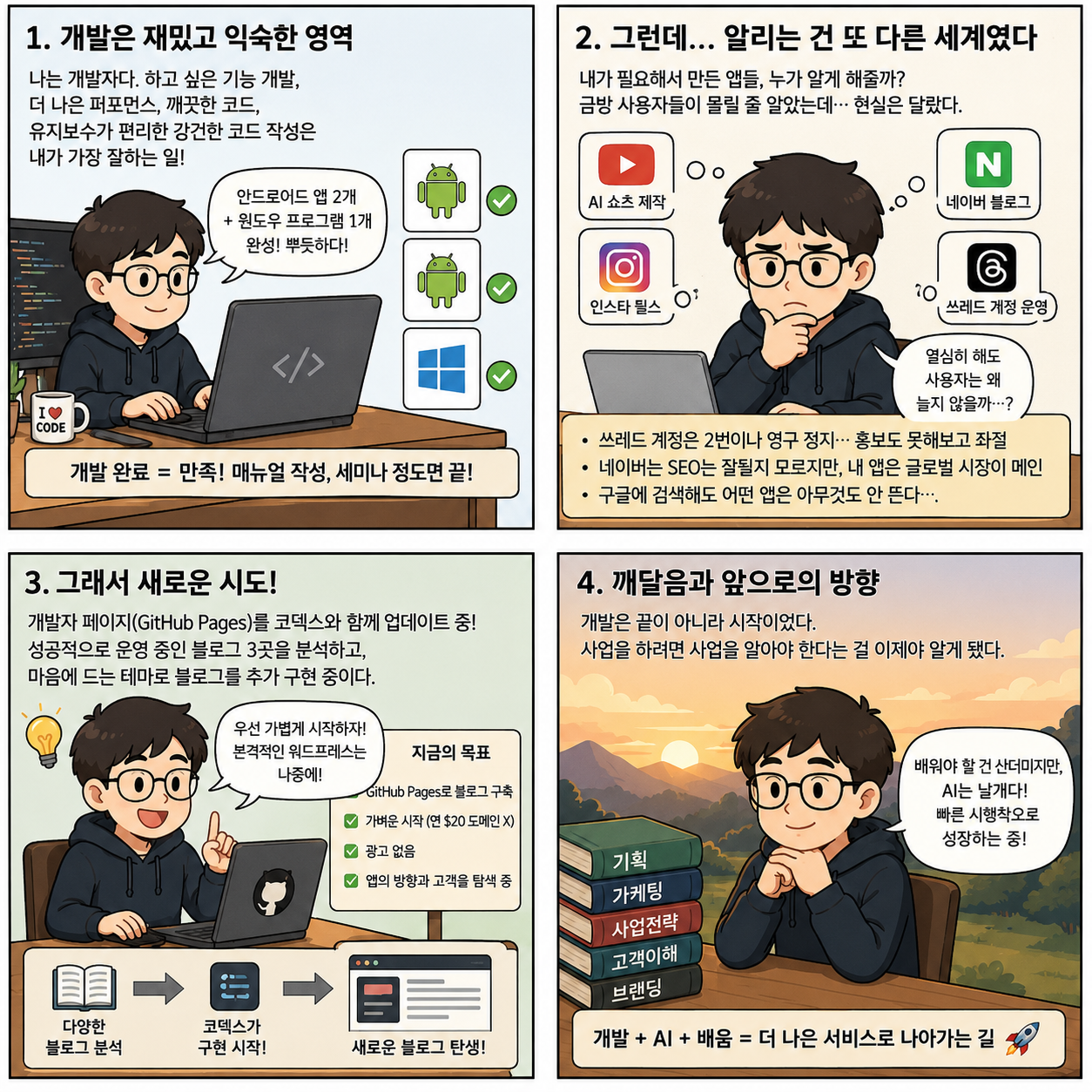
<p><img src="/assets/images/posts/app-development-beyond-coding-en.png" alt="English-localized four-panel illustration of a solo developer learning marketing and business after finishing an app" /></p>

<p><em>A new journey into marketing and business began after development was complete.</em></p>

<p>#SoloDeveloper #IndieHacker #AppDevelopment #AndroidDevelopment #Developer #DeveloperBlog #AIDevelopment #AIForDevelopers #ClaudeCode #Codex #GitHubPages #WordPress #SEO #SearchOptimization #AppMarketing #AppPromotion #Startup #Entrepreneurship #SideProject #ProductBuilding #MVP #DeveloperJournal #ServiceDevelopment #BusinessLearning #DeveloperFounder #SoloFounder #AppLaunch #DevelopmentJourney</p>]]></content><author><name>LazyDaddy</name></author><category term="App Development" /><category term="solo-development" /><category term="indie-hacker" /><category term="app-development" /><category term="Android-development" /><category term="AI-development" /><category term="Codex" /><category term="Claude-Code" /><category term="GitHub-Pages" /><category term="SEO" /><category term="app-marketing" /><category term="startup" /><category term="side-project" /><category term="MVP" /><category term="developer-journal" /><category term="business-learning" /><summary type="html"><![CDATA[A solo developer's honest account of finishing apps with AI, then learning the harder lessons of marketing, search visibility, customer problems, and business.]]></summary><media:thumbnail xmlns:media="http://search.yahoo.com/mrss/" url="https://ocxeverywhere.github.io/assets/images/posts/app-development-beyond-coding-en.png" /><media:content medium="image" url="https://ocxeverywhere.github.io/assets/images/posts/app-development-beyond-coding-en.png" xmlns:media="http://search.yahoo.com/mrss/" /></entry><entry xml:lang="ko"><title type="html">[앱 개발 도전기 #4] 개발이 끝나면 끝!?</title><link href="https://ocxeverywhere.github.io/blog/posts/app-development-beyond-coding/" rel="alternate" type="text/html" title="[앱 개발 도전기 #4] 개발이 끝나면 끝!?" /><published>2026-07-12T01:16:00+03:00</published><updated>2026-07-12T01:16:00+03:00</updated><id>https://ocxeverywhere.github.io/blog/posts/app-development-beyond-coding</id><content type="html" xml:base="https://ocxeverywhere.github.io/blog/posts/app-development-beyond-coding/"><![CDATA[<p>첫 개발 도전기에서 얘기했듯이 나는 개발자다.</p>

<p>그래서 하고 싶은 기능을 개발하고, 더 나은 퍼포먼스를 고민하고, 깨끗하면서도 유지보수가 편리한 강건한 코드를 작성하는 일에는 아주 익숙하다. 클로드 코드와 코덱스를 써서 재미있게 안드로이드 앱 2개와 윈도우 프로그램도 만들었다.</p>

<p>대개의 경우 개발자로서의 나는 이 단계에서 만족했다. 조금 더 신경 쓴다면 사용자 매뉴얼을 친절하게 작성하거나, 세미나와 사용자 미팅에서 새로운 기능을 소개하는 정도가 전부였다.</p>

<h2 id="개발이-끝난-뒤-만난-또-다른-세계">개발이 끝난 뒤 만난 또 다른 세계</h2>

<p>그러나 내가 필요해서 만든 자급자족 앱들을 다른 사람들에게 알리는 일은 정말 또 다른 세계였다.</p>

<p>금방 몇백, 몇천 명의 사용자가 생길 거라는 기대는 한두 달이 지난 지금 말끔히 사라졌다. 대신 이런 질문을 고민하게 됐다.</p>

<ul>
  <li>어떻게 해야 이 앱들이 대중에게 노출될까?</li>
  <li>이 앱을 필요로 하는 사람들은 누구일까?</li>
  <li>비즈니스 관점에서 어떻게 마케팅하고 홍보해야 할까?</li>
</ul>

<p>AI에게 추천받아 AI 쇼츠를 만들고 인스타그램 릴스에도 공유해 봤다. 이제 GPT 이미지와 Google Flow로 쇼츠 영상을 만들고 CapCut으로 편집하는 일도 익숙해졌다.</p>

<p>그럼에도 사용자는 쉽게 늘지 않았다. 한국 시장을 우선 대상으로 삼았기에 네이버 블로그를 만들고 글을 쓰기 시작했다. 나 역시 한국에서 무언가를 찾아야 할 때면 여전히 네이버에서 검색하거나 네이버 카페를 기웃거리기 때문이다.</p>

<h2 id="홍보도-시행착오의-연속이었다">홍보도 시행착오의 연속이었다</h2>

<p>비즈니스 모델이 명확하지 않아 개발한 모든 앱과 프로그램을 무료로 제공하고 있지만, 사용자는 쉽게 늘지 않았다. 다른 홍보 방안으로 Threads 계정도 만들었다.</p>

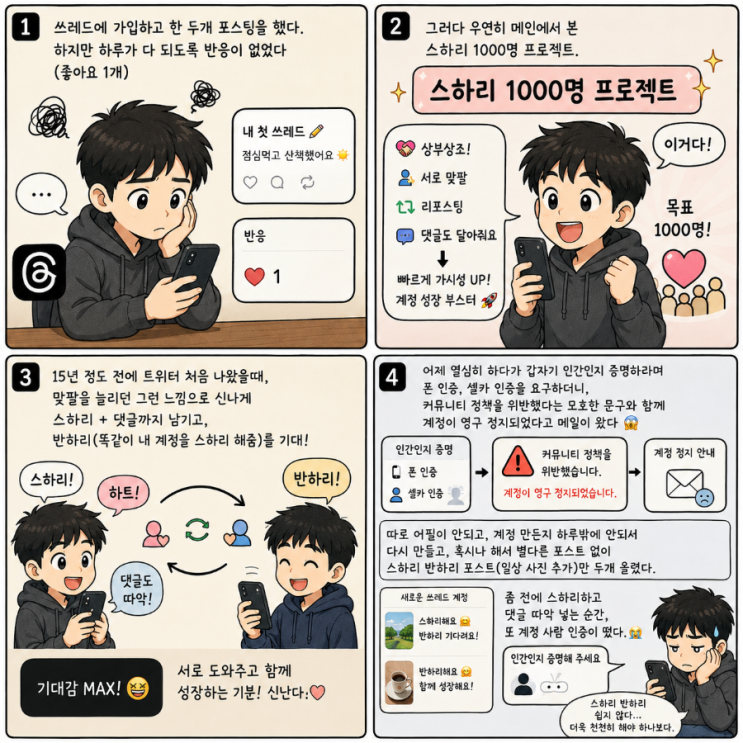
<p>하지만 Threads는 광고나 AI로 추정되는 활동에 매우 민감하게 반응했다. 결국 나는 계정을 두 번이나 영구 정지당했다. 홍보도 제대로 해 보지 못한 채 팔로워를 늘리다가 꺾인 것이다. 이 과정은 이전 글에 적었다.</p>

<p><a class="link-preview" href="https://blog.naver.com/lazydaddypresent0523/224335892630" target="_blank" rel="noopener noreferrer sponsored">
  <span class="link-preview__media">
    <img src="/assets/images/posts/threads-follow-back-preview.png" alt="스하리와 반하리 경험을 다룬 네이버 블로그 글 미리보기" loading="lazy" decoding="async" />
  </span>
  <span class="link-preview__body">
    <strong>[광고포함] 스하리 반하리 아세요?</strong>
    <span>Threads에서 팔로워를 늘리며 겪은 시행착오를 기록한 이전 글입니다.</span>
    <small>blog.naver.com ↗</small>
  </span>
</a></p>

<h2 id="글로벌-검색을-위해-github-pages를-고치다">글로벌 검색을 위해 GitHub Pages를 고치다</h2>

<p>네이버 블로그는 네이버 검색에서는 잘 노출될지 모르지만, 내 앱과 서비스의 주 무대는 사실 글로벌 시장이다. 구글에서 관련 앱을 검색해 보면 어떤 앱은 아무것도 나타나지 않는다.</p>

<p>그래서 기존의 개발자 페이지이자 앱 소개 페이지였던 GitHub Pages 사이트를 코덱스로 업데이트하고 있다.</p>

<p>먼저 코덱스에게 GitHub Pages로 블로그를 성공적으로 운영하는 대표적인 페이지 3곳을 추천받았다. 그 사이트들을 분석한 뒤 마음에 드는 테마를 참고해 기존 페이지에 블로그를 추가하기 시작했다. 아니, 정확히는 코덱스가 작업을 시작했다.</p>

<p>코덱스가 GitHub Pages에 어떤 블로그 기능을 만들어 줄 수 있는지 궁금하다면, GPT Plus 무료 5시간 사용량만으로 만든 이 페이지를 보면 된다.</p>

<p>물론 토큰을 이렇게 관리하려면 웹 코더 스킬과 그 스킬에 기반한 워커 에이전트를 미리 만들어 두어야 한다. 내가 사용한 방법은 이전 글에서 자세히 설명했다.</p>

<p><a class="link-preview" href="https://ocxeverywhere.github.io/blog/posts/claude-code-token-management/" target="_blank" rel="noopener noreferrer">
  <span class="link-preview__media">
    <img src="/assets/img/social/default-card.png" alt="LazyDaddy 앱 개발 블로그의 클로드 코드 토큰 관리 글" loading="lazy" decoding="async" />
  </span>
  <span class="link-preview__body">
    <strong>[앱 개발 도전기 #2] 클로드 코드 — 토큰 소모량을 관리하자</strong>
    <span>모델 선택과 에이전트, 테스트, 리뷰를 활용해 AI 코딩 토큰을 관리하는 방법입니다.</span>
    <small>ocxeverywhere.github.io ↗</small>
  </span>
</a></p>

<p><a class="link-preview" href="https://ocxeverywhere.github.io/" target="_blank" rel="noopener noreferrer">
  <span class="link-preview__media">
    <img src="/assets/img/social/default-card.png" alt="LazyDaddy 앱과 개발 블로그 홈페이지" loading="lazy" decoding="async" />
  </span>
  <span class="link-preview__body">
    <strong>LazyDaddy</strong>
    <span>생활의 작은 반복을 줄이는 Android 및 Windows 앱과 개발 기록을 소개합니다.</span>
    <small>ocxeverywhere.github.io ↗</small>
  </span>
</a></p>

<h2 id="아직은-답보다-질문이-더-많다">아직은 답보다 질문이 더 많다</h2>

<p>본격적인 블로그라면 워드프레스가 여러 면에서 훨씬 좋다는 것도 알게 됐다. 하지만 아직은 본격적일 필요가 없다. 그런 이유로 연간 약 20달러인 별도 도메인도 당분간 신청하지 않을 계획이다. 구글 광고나 다른 광고도 필요 없다.</p>

<p>아직 이 앱들이 어떤 방향으로, 어떤 고객의 문제나 요구를 해결해 줄지 전혀 모르기 때문이다.</p>

<p>이제야 조금씩 사업을 이해해 가는 것 같다. 기획의 중요성, 마케팅의 역할, 그리고 개발자가 흥미를 느끼거나 단지 만들 수 있어서 추가한 기능은 사용자에게 정말 쓸데없을 수도 있다는 사실까지.</p>

<p>여러 고민을 하고 책을 읽으며, 비슷한 경험을 한 유튜버들의 이야기도 찾아봤다. 그 과정에서 앱 설치 수 100회를 넘기는 일조차 정말 쉽지 않다는 것을 알게 됐다.</p>

<p>이 문제는 AI가 날개를 달아 준 요즘의 1인 개발만의 문제가 아니라 사업의 본질에 가까울 것이다. 그동안 내가 굳이 알려 하지 않았고, 알지 않아도 됐던 영역이다.</p>

<p>결국 사업을 하려면 사업을 알아야 한다. 배워야 할 것이 아직 산더미다.</p>

<p>그래도 AI가 개발뿐 아니라 이 모든 분야를 가속해 주고, 더 빠르게 시행착오를 겪도록 도와준다는 것은 정말 큰 행운이다.</p>

<p><img src="/assets/images/posts/app-development-beyond-coding.png" alt="앱 개발 이후 마케팅과 사업의 과제를 마주한 1인 개발자 일러스트" /></p>

<p><em>개발을 마친 뒤 시작된 마케팅과 사업 공부라는 새로운 여정</em></p>

<p>#1인개발 #인디해커 #앱개발 #안드로이드개발 #개발자 #개발블로그 #AI개발 #AI활용 #클로드코드 #코덱스 #GitHubPages #깃허브페이지 #워드프레스 #SEO #검색최적화 #앱마케팅 #앱홍보 #스타트업 #창업 #사이드프로젝트 #프로덕트빌딩 #MVP #개발일기 #서비스개발 #사업공부 #개발자창업 #1인창업 #개발자생존기 #앱출시 #개발도전기</p>]]></content><author><name>LazyDaddy</name></author><category term="앱 개발" /><category term="1인개발" /><category term="인디해커" /><category term="앱개발" /><category term="안드로이드개발" /><category term="AI개발" /><category term="코덱스" /><category term="클로드코드" /><category term="GitHubPages" /><category term="SEO" /><category term="앱마케팅" /><category term="앱홍보" /><category term="스타트업" /><category term="사이드프로젝트" /><category term="MVP" /><category term="개발일기" /><category term="사업공부" /><summary type="html"><![CDATA[AI로 앱을 완성한 뒤 마케팅, 검색 노출, 고객 문제와 사업의 본질을 배워 가는 1인 개발자의 시행착오를 기록합니다.]]></summary><media:thumbnail xmlns:media="http://search.yahoo.com/mrss/" url="https://ocxeverywhere.github.io/assets/images/posts/app-development-beyond-coding.png" /><media:content medium="image" url="https://ocxeverywhere.github.io/assets/images/posts/app-development-beyond-coding.png" xmlns:media="http://search.yahoo.com/mrss/" /></entry><entry xml:lang="en"><title type="html">[Parenting Tip] How to Read Your Child’s Favorite Korean Storybooks in English</title><link href="https://ocxeverywhere.github.io/en/blog/posts/read-korean-storybooks-in-english/" rel="alternate" type="text/html" title="[Parenting Tip] How to Read Your Child’s Favorite Korean Storybooks in English" /><published>2026-07-10T17:37:00+03:00</published><updated>2026-07-12T12:00:00+03:00</updated><id>https://ocxeverywhere.github.io/en/blog/posts/read-korean-storybooks-in-english</id><content type="html" xml:base="https://ocxeverywhere.github.io/en/blog/posts/read-korean-storybooks-in-english/"><![CDATA[<p>Take a look at the storybooks filling your shelves at home. These days, many families have both Korean and English books.</p>

<p>But the books children love and ask for again and again are often the familiar Korean ones, aren’t they?</p>

<p>What if you could read those familiar stories in English? The story would feel fresh to your child while helping English become a natural part of reading time.</p>

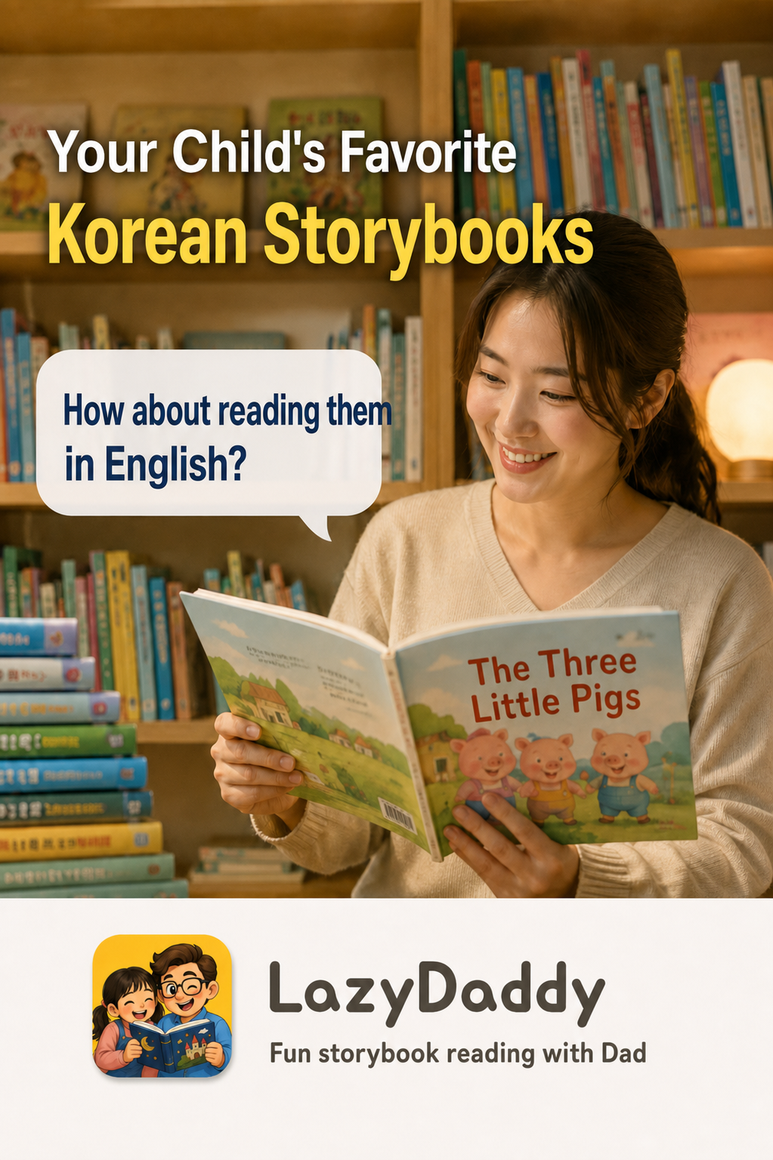
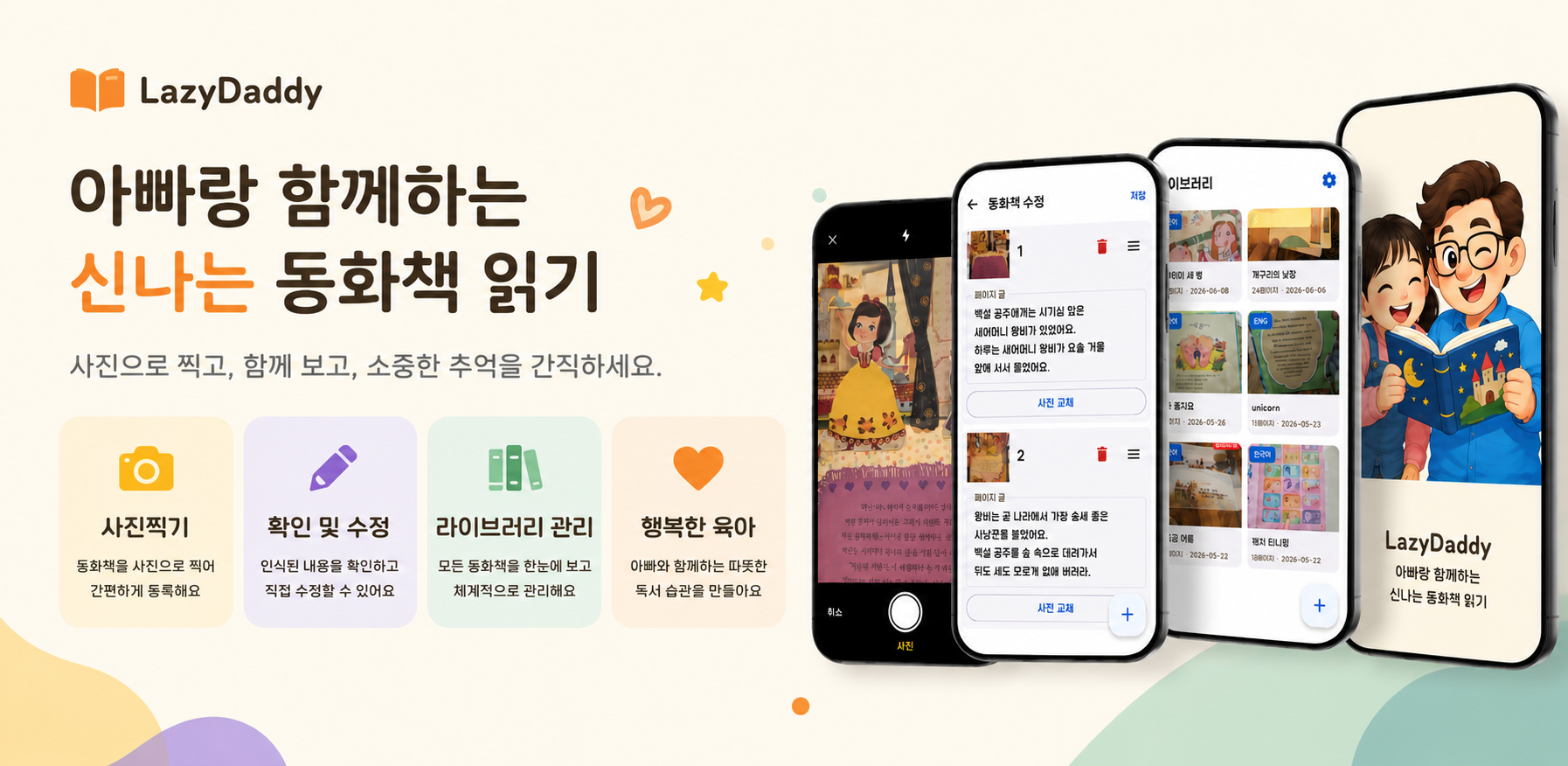
<p><img src="/assets/images/posts/lazydaddy-english-storybook-feature-en.png" alt="English-localized LazyDaddy guide to translating a Korean storybook and reading it aloud in English" /></p>

<h2 id="how-to-turn-a-korean-storybook-into-an-english-read-aloud">How to Turn a Korean Storybook into an English Read-Aloud</h2>

<p>The LazyDaddy Android app makes this possible.</p>

<p>First, choose your child’s favorite storybook.</p>

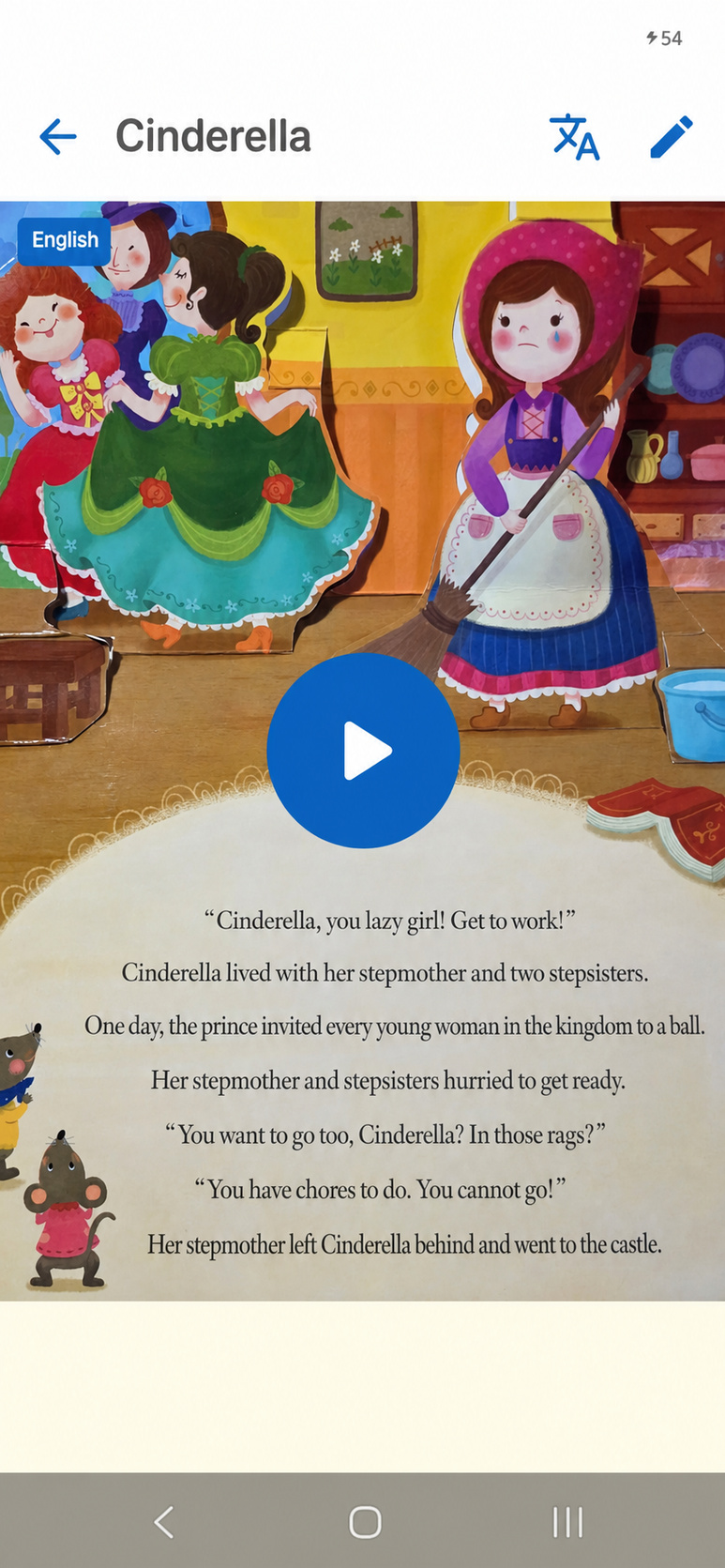
<ol>
  <li>Take a picture of the book page. Focus on the text so your child can turn the pages.</li>
  <li>Tap <strong>Create</strong> to generate Korean audio and hear the book read aloud in Korean.</li>
  <li>Tap the Chinese character and English translation icon in the upper-right corner of the book screen.</li>
  <li>The story changes to English, and the app plays it with an English voice.</li>
</ol>

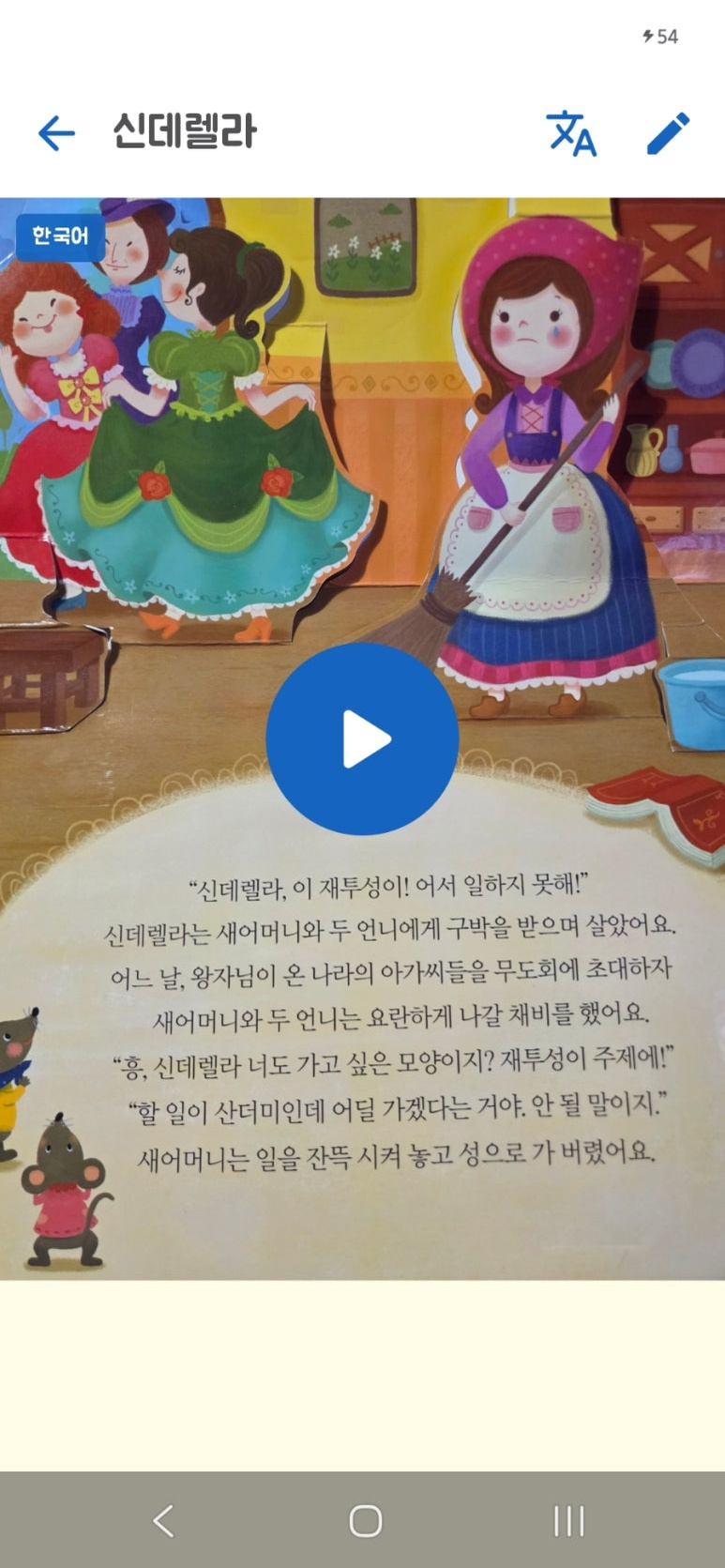
<p><img src="/assets/images/posts/lazydaddy-english-translation-screen-en.jpg" alt="English-localized LazyDaddy app screen translating storybook text and playing the narration" /></p>

<h2 id="start-english-exposure-with-a-familiar-story">Start English Exposure with a Familiar Story</h2>

<p>LazyDaddy is still in its early release stage, so you can try premium features like this for free.</p>

<p>Why not pick the book your child loves most and give it a try? Visit the official page below to get started with LazyDaddy for free.</p>

<p><a class="link-preview" href="https://ocxeverywhere.github.io/LazyDaddy/" target="_blank" rel="noopener noreferrer">
  <span class="link-preview__media">
    <img src="/assets/images/posts/lazydaddy-english-storybook-link-preview-en.png" alt="English-localized preview of the LazyDaddy storybook reading feature" loading="lazy" decoding="async" />
  </span>
  <span class="link-preview__body">
    <strong>LazyDaddy</strong>
    <span>Make storybook time more fun with Dad. Find LazyDaddy on Google Play.</span>
    <small>ocxeverywhere.github.io ↗</small>
  </span>
</a></p>

<p>#EnglishStorybooks #EnglishReadAloud #EnglishAtHome #EnglishEducation #EarlyEnglishLearning #EnglishExposure #KoreanStorybooks #ParentingTips #AIParenting #ParentingApp #AITranslation #ReadingAloud #LazyDaddy</p>]]></content><author><name>LazyDaddy</name></author><category term="LazyDaddy" /><category term="English storybooks" /><category term="English read-aloud" /><category term="English at home" /><category term="early English learning" /><category term="English exposure" /><category term="Korean storybooks" /><category term="parenting tips" /><category term="AI parenting" /><category term="AI translation" /><category term="reading aloud" /><category term="LazyDaddy" /><summary type="html"><![CDATA[A simple way to give familiar Korean storybooks a new voice with LazyDaddy’s AI translation and English narration.]]></summary><media:thumbnail xmlns:media="http://search.yahoo.com/mrss/" url="https://ocxeverywhere.github.io/assets/images/posts/lazydaddy-english-storybook-feature-en.png" /><media:content medium="image" url="https://ocxeverywhere.github.io/assets/images/posts/lazydaddy-english-storybook-feature-en.png" xmlns:media="http://search.yahoo.com/mrss/" /></entry><entry xml:lang="ko"><title type="html">[육아 꿀팁] 아이가 좋아하는 한글 동화책, 이제 영어로 읽는 방법</title><link href="https://ocxeverywhere.github.io/blog/posts/read-korean-storybooks-in-english/" rel="alternate" type="text/html" title="[육아 꿀팁] 아이가 좋아하는 한글 동화책, 이제 영어로 읽는 방법" /><published>2026-07-10T17:37:00+03:00</published><updated>2026-07-12T12:00:00+03:00</updated><id>https://ocxeverywhere.github.io/blog/posts/read-korean-storybooks-in-english</id><content type="html" xml:base="https://ocxeverywhere.github.io/blog/posts/read-korean-storybooks-in-english/"><![CDATA[<p>집 책장에 가득 찬 동화책. 요즘에는 한글 동화책도, 영어 동화책도 많지요?</p>

<p>하지만 아이들이 좋아하고 계속 찾는 책은 대개 익숙한 한글 동화책이 아닐까요?</p>

<p>이럴 때 익숙한 이야기를 영어로 읽어준다면 아이도 신선하게 느끼고, 영어에도 자연스럽게 녹아들 수 있지 않을까요?</p>

<p><img src="/assets/images/posts/lazydaddy-english-storybook-feature.png" alt="한글 동화책을 영어 음성으로 읽어주는 LazyDaddy 기능과 사용 모습을 담은 이미지" /></p>

<h2 id="한글-동화책을-영어로-바꾸는-방법">한글 동화책을 영어로 바꾸는 방법</h2>

<p>안드로이드 앱 LazyDaddy가 이걸 또 가능하게 해줍니다.</p>

<p>우선 아이가 가장 좋아하는 동화책을 준비하세요.</p>

<ol>
  <li>책 페이지를 사진으로 찍어주세요. 책장은 아이가 넘길 수 있도록 글자 위주로 촬영하면 됩니다.</li>
  <li><strong>생성하기</strong>를 누르면 한국어 음성이 생성되어 책을 한국어로 읽어줍니다.</li>
  <li>책 화면 오른쪽 위의 한자·영어 번역 아이콘을 눌러보세요.</li>
  <li>책 내용이 영어로 바뀌고 영어 목소리까지 재생됩니다.</li>
</ol>

<p><img src="/assets/images/posts/lazydaddy-english-translation-screen.jpg" alt="LazyDaddy에서 동화책 문장을 영어로 번역하고 음성을 재생하는 앱 화면" /></p>

<h2 id="익숙한-이야기로-시작하는-영어-노출">익숙한 이야기로 시작하는 영어 노출</h2>

<p>출시 초기라 이런 프리미엄 기능도 무료로 체험해볼 수 있어요.</p>

<p>지금 아이가 가장 좋아하는 책 한 권을 골라볼까요? 아래 공식 페이지에서 LazyDaddy를 무료로 만나보세요.</p>

<p><a class="link-preview" href="https://ocxeverywhere.github.io/LazyDaddy/" target="_blank" rel="noopener noreferrer">
  <span class="link-preview__media">
    <img src="/assets/images/posts/lazydaddy-english-storybook-link-preview.png" alt="LazyDaddy 앱의 동화책 읽기 기능 미리보기" loading="lazy" decoding="async" />
  </span>
  <span class="link-preview__body">
    <strong>LazyDaddy | 레이지 대디</strong>
    <span>아빠와 함께하는 신나는 동화책 읽기. Google Play 스토어에서 만나보세요.</span>
    <small>ocxeverywhere.github.io ↗</small>
  </span>
</a></p>

<p>#영어동화 #영어동화책 #영어책읽기 #엄마표영어 #영어교육 #유아영어 #영어노출 #영어공부 #영어책추천 #동화책 #한글동화책 #육아꿀팁 #AI육아 #육아앱 #영어학습 #AI번역 #동화책읽기 #LazyDaddy #레이지대디 #영어읽어주기</p>]]></content><author><name>LazyDaddy</name></author><category term="LazyDaddy" /><category term="영어동화" /><category term="영어동화책" /><category term="엄마표영어" /><category term="유아영어" /><category term="영어노출" /><category term="한글동화책" /><category term="육아꿀팁" /><category term="AI육아" /><category term="AI번역" /><category term="동화책읽기" /><category term="LazyDaddy" /><summary type="html"><![CDATA[아이가 좋아하는 한글 동화책을 LazyDaddy의 AI 번역과 영어 음성으로 새롭게 읽어주는 간단한 방법을 소개합니다.]]></summary><media:thumbnail xmlns:media="http://search.yahoo.com/mrss/" url="https://ocxeverywhere.github.io/assets/images/posts/lazydaddy-english-storybook-feature.png" /><media:content medium="image" url="https://ocxeverywhere.github.io/assets/images/posts/lazydaddy-english-storybook-feature.png" xmlns:media="http://search.yahoo.com/mrss/" /></entry><entry xml:lang="en"><title type="html">Welcome to the LazyDaddy Blog</title><link href="https://ocxeverywhere.github.io/en/blog/posts/welcome-to-ocx-everywhere/" rel="alternate" type="text/html" title="Welcome to the LazyDaddy Blog" /><published>2026-07-10T09:00:00+03:00</published><updated>2026-07-10T09:00:00+03:00</updated><id>https://ocxeverywhere.github.io/en/blog/posts/welcome-to-ocx-everywhere</id><content type="html" xml:base="https://ocxeverywhere.github.io/en/blog/posts/welcome-to-ocx-everywhere/"><![CDATA[<h1 id="welcome-to-the-lazydaddy-blog">Welcome to the LazyDaddy Blog</h1>

<p>LazyDaddy now has a dedicated place for articles alongside the app portfolio. The English blog will collect practical notes about the products and the work behind them.</p>

<h2 id="what-to-expect">What to expect</h2>

<p>Articles may cover:</p>

<ul>
  <li>Product updates and the reasoning behind them</li>
  <li>Focused guides for using an app</li>
  <li>Engineering notes from Android and Windows development</li>
</ul>

<p>The <a href="/en/blog/">English Blog</a> lists English posts. Korean posts have their own index at <a href="/blog/">한국어 블로그</a>, so readers can stay within their preferred language.</p>

<h2 id="find-an-app">Find an app</h2>

<p>The <a href="/#apps">LazyDaddy portal</a> links to the current app websites and store listings for LazyDaddy, JustListen, and LazyDaddy Game Recording.</p>

<h2 id="get-in-touch">Get in touch</h2>

<p>For product support, use the relevant app website or visit the <a href="/en/support/">support page</a>. Questions about the site or business inquiries can be sent through the <a href="/en/contact/">contact page</a>.</p>]]></content><author><name>LazyDaddy</name></author><category term="Updates" /><category term="lazydaddy" /><category term="apps" /><summary type="html"><![CDATA[A guide to the product stories, app notes, and engineering articles published by LazyDaddy.]]></summary><media:thumbnail xmlns:media="http://search.yahoo.com/mrss/" url="https://ocxeverywhere.github.io/assets/img/social/default-card.png" /><media:content medium="image" url="https://ocxeverywhere.github.io/assets/img/social/default-card.png" xmlns:media="http://search.yahoo.com/mrss/" /></entry><entry xml:lang="en"><title type="html">[Includes Advertising] A Game Recording Tool for My Son’s YouTube Channel</title><link href="https://ocxeverywhere.github.io/en/blog/posts/game-recording-tool-for-my-son/" rel="alternate" type="text/html" title="[Includes Advertising] A Game Recording Tool for My Son’s YouTube Channel" /><published>2026-07-08T07:23:00+03:00</published><updated>2026-07-08T09:00:00+03:00</updated><id>https://ocxeverywhere.github.io/en/blog/posts/game-recording-tool-for-my-son</id><content type="html" xml:base="https://ocxeverywhere.github.io/en/blog/posts/game-recording-tool-for-my-son/"><![CDATA[<p>This page is part of the Coupang Partners affiliate program. I may receive a commission on purchases made through the links on this page.</p>

<p>My son absolutely loves games.</p>

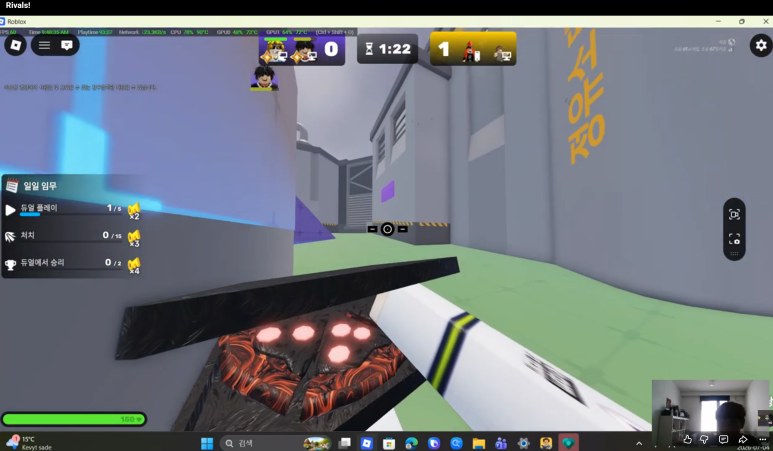
<p>These days, he mostly plays Roblox. RIVALS is his favorite, and he is a light user who only makes the occasional small in-game purchase with gift cards he receives for his birthday.</p>

<p>RIVALS is a first-person shooter featuring Roblox characters, and he plays on a team with his friends every day. He even manages to land perfectly timed kills with this Chun-sik mouse that we brought from Korea, which became a huge hit with his classmates.</p>

<p><a class="link-preview" href="https://link.coupang.com/a/fdyeSLJCdE" target="_blank" rel="noopener noreferrer sponsored">
  <span class="link-preview__media">
    <img src="/assets/images/posts/coupang-mouse.jpg" alt="Chun-sik wireless mouse preview" loading="lazy" decoding="async" />
  </span>
  <span class="link-preview__body">
    <strong>Kakao Friends Wireless Bread Chun-sik Mouse</strong>
    <span>The wireless mouse used for Roblox gameplay in this story.</span>
    <small>link.coupang.com ↗</small>
  </span>
</a></p>

<p><img src="/assets/images/posts/jiun-game-channel.png" alt="Jiun Games YouTube channel celebrating 1,000 subscribers" /></p>

<p><em>The Jiun Games YouTube channel celebrating 1,000 subscribers</em></p>

<p><a class="link-preview" href="https://www.youtube.com/channel/UC2r3Z3jOIA9laB1P8O8sUxg" target="_blank" rel="noopener noreferrer">
  <span class="link-preview__media">
    <img src="/assets/images/posts/jiun-game-youtube-preview.png" alt="Black and gold Jiun Game YouTube channel preview" loading="lazy" decoding="async" />
  </span>
  <span class="link-preview__body">
    <strong>Jiun’s Gaming YouTube Channel</strong>
    <span>Watch Roblox gameplay videos created with LazyDaddy Game Recording.</span>
    <small>www.youtube.com ↗</small>
  </span>
</a></p>

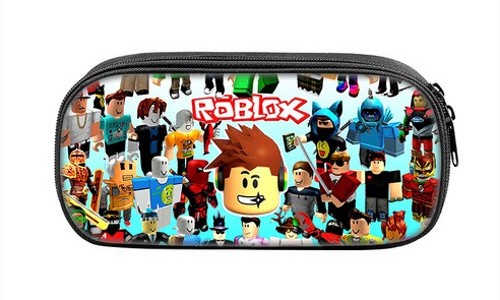
<p>Roblox is also incredibly popular among elementary school students here in Finland, and items like this are popular birthday gifts.</p>

<p><a class="link-preview" href="https://link.coupang.com/a/fdxK6RDIM8" target="_blank" rel="noopener noreferrer sponsored">
  <span class="link-preview__media">
    <img src="/assets/images/posts/coupang-roblox-case.jpg" alt="Roblox pencil case preview" loading="lazy" decoding="async" />
  </span>
  <span class="link-preview__body">
    <strong>ROBLOX Pencil Case and Gift Merchandise</strong>
    <span>A pencil case gift for children who enjoy Roblox.</span>
    <small>link.coupang.com ↗</small>
  </span>
</a></p>

<p>One day, he created a YouTube account and started uploading gaming videos. They were simply gameplay recordings, with no commentary and without showing his face.</p>

<p>The recording software was paid, so he would use a free trial until it expired, then search for and install another program, and then another. I felt bad watching him go through that, so I started this project to make him a Windows application that could capture video with the basic features he needed.</p>

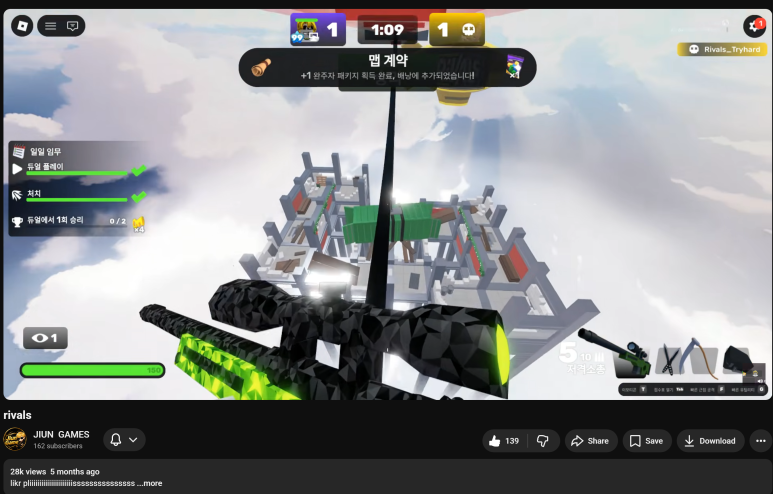
<p><img src="/assets/images/posts/roblox-rivals-28k-video.png" alt="Roblox RIVALS gameplay video" /></p>

<p><em>The Roblox RIVALS gameplay video that caught the algorithm and reached 28K views</em></p>

<p>Roblox RIVALS — the video that somehow caught the algorithm and reached 28K views (we still have no idea why it took off)</p>

<p>Once I confirmed that video recording and screenshots worked well, I wanted to distribute the app so that other gamers—not just my son, and especially other elementary school gamers—could use it. I thought it would be best to publish it officially through the trusted Microsoft Store, so I submitted it.</p>

<p>I had originally created an EXE installer, but when I applied for publication, I received feedback that the installer was unsigned and needed improvement. With help from AI, I converted it to MSIX instead. This approach meant it would receive Microsoft’s signature, making it more trustworthy, and it was also free.</p>

<p>I submitted v1.0.3, and a few days later I received comments requesting improvements. The manual test results showed that the app’s core functionality did not work in a particular environment.</p>

<p>I fixed it, tested it myself, had my son test it in actual use, collected his feedback, improved it, and submitted it for approval again. After repeating this process about three times, the version reached v1.0.10, while the feature set became a little simpler.</p>

<p><img src="/assets/images/posts/lazydaddy-game-recording-pip.png" alt="Roblox RIVALS video recorded with LazyDaddy Game Recording and PIP" /></p>

<p><em>A game recording made with the PIP feature in LazyDaddy Game Recording v1.0.8</em></p>

<p>A RIVALS YouTube video created with LazyDaddy Game Recording v1.0.8 (with PIP)</p>

<p>With the PIP feature, he can react enthusiastically like the YouTubers he enjoys watching. Perhaps that will help him create more entertaining YouTube videos to share with his friends.</p>

<p>It can get a little noisy sometimes, so a gaming headset like this would be really useful.</p>

<p><a class="link-preview" href="https://link.coupang.com/a/fdx5HUfYqa" target="_blank" rel="noopener noreferrer sponsored">
  <span class="link-preview__media">
    <img src="/assets/images/posts/coupang-headset.jpg" alt="USB gaming headset preview" loading="lazy" decoding="async" />
  </span>
  <span class="link-preview__body">
    <strong>OMIIYA Virtual 7.1-Channel USB Gaming Headset</strong>
    <span>A USB headset suitable for game recording and voice reactions.</span>
    <small>link.coupang.com ↗</small>
  </span>
</a></p>

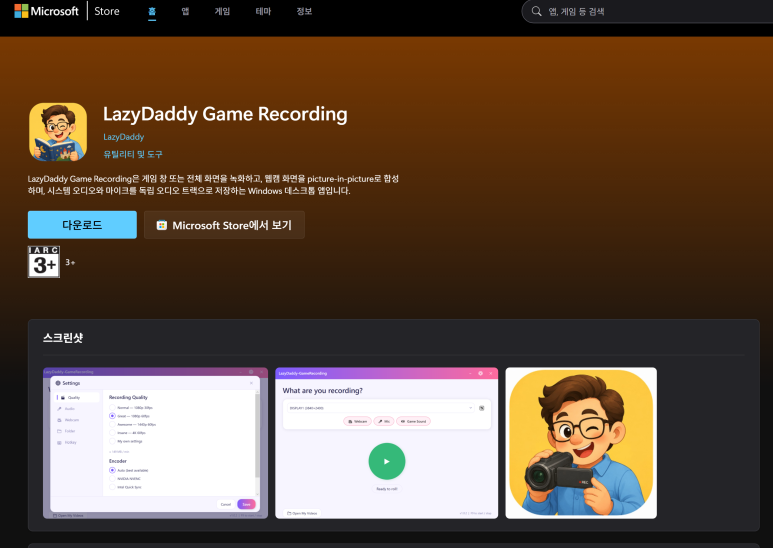
<p>Then, at last, I received a notification today that the app had finally been published on the Microsoft Store.</p>

<p><img src="/assets/images/posts/microsoft-store-lazydaddy-game-recording.png" alt="LazyDaddy Game Recording app listing in the Microsoft Store" /></p>

<p><em>LazyDaddy Game Recording officially listed in the Microsoft Store</em></p>

<p>For now, I plan to keep maintaining this app for free unless our power user raises complaints or requests improvements.</p>

<p>Of course, this program was also developed through AI-assisted vibe coding. In fact, this is the project that I first started in Claude Code. At some point, a feature stopped working, and I failed several times to fix it. I then tried to modify the code with Opus 4.6 while reviewing it in Visual Studio GitHub Copilot, but failed several more times. Codex 5.5 ultimately solved the problem in one shot. (See the previous post for details.)</p>

<p><a class="link-preview" href="https://blog.naver.com/lazydaddypresent0523/224333733438" target="_blank" rel="noopener noreferrer">
  <span class="link-preview__media">
    <img src="/assets/images/posts/game-recording-app.png" alt="LazyDaddy Game Recording app icon" loading="lazy" decoding="async" />
  </span>
  <span class="link-preview__body">
    <strong>[App Development Challenge #3] Switching to Codex</strong>
    <span>The earlier development story about solving the recording issue after trying Claude Code and GitHub Copilot.</span>
    <small>blog.naver.com ↗</small>
  </span>
</a></p>

<p>If you are looking for free game recording software, or want an easy way to record games such as Roblox and create YouTube videos, give it a try. I also plan to continue sharing my experience with the Microsoft Store submission process, MSIX packaging, and AI vibe coding with Codex.</p>

<p>For a detailed description of the program or to download it, visit the app site below. (Codex also created this simple app site for me. Initially, I only made a basic page because I needed a privacy policy for the Microsoft Store submission.)</p>

<p><a class="link-preview" href="https://ocxeverywhere.github.io/LazyDaddy-GameCapture/" target="_blank" rel="noopener noreferrer">
  <span class="link-preview__media">
    <img src="/assets/images/posts/game-recording-app.png" alt="LazyDaddy Game Recording app icon" loading="lazy" decoding="async" />
  </span>
  <span class="link-preview__body">
    <strong>LazyDaddy Game Recording</strong>
    <span>Explore features and download information for the free Windows game, webcam, and microphone recorder.</span>
    <small>ocxeverywhere.github.io ↗</small>
  </span>
</a></p>

<p>#GameRecording #GameRecordingSoftware #ScreenRecording #ScreenCapture #GameCapture #FreeSoftware #FreeGameRecording #WindowsApp #MicrosoftStore #MSIX #Roblox #RIVALS #YouTubeGaming #GamingYouTuber #VibeCoding #AIDevelopment #Codex #ClaudeCode #GitHubCopilot #LazyDaddy</p>]]></content><author><name>LazyDaddy</name></author><category term="LazyDaddy Game Recording" /><category term="game recording" /><category term="game recording software" /><category term="screen recording" /><category term="screen capture" /><category term="game capture" /><category term="free software" /><category term="free game recording" /><category term="Windows app" /><category term="Microsoft Store" /><category term="MSIX" /><category term="Roblox" /><category term="RIVALS" /><category term="YouTube gaming" /><category term="gaming YouTuber" /><category term="vibe coding" /><category term="AI development" /><category term="Codex" /><category term="Claude Code" /><category term="GitHub Copilot" /><category term="LazyDaddy" /><summary type="html"><![CDATA[The story of building a free Windows recording app for my son, who uploads gaming videos, and releasing it on the Microsoft Store.]]></summary><media:thumbnail xmlns:media="http://search.yahoo.com/mrss/" url="https://ocxeverywhere.github.io/assets/img/social/default-card.png" /><media:content medium="image" url="https://ocxeverywhere.github.io/assets/img/social/default-card.png" xmlns:media="http://search.yahoo.com/mrss/" /></entry><entry xml:lang="ko"><title type="html">[광고포함] 유튜브하는 우리 아들을 위한 게임 영상 캡쳐 툴</title><link href="https://ocxeverywhere.github.io/blog/posts/game-recording-tool-for-my-son/" rel="alternate" type="text/html" title="[광고포함] 유튜브하는 우리 아들을 위한 게임 영상 캡쳐 툴" /><published>2026-07-08T07:23:00+03:00</published><updated>2026-07-08T09:00:00+03:00</updated><id>https://ocxeverywhere.github.io/blog/posts/game-recording-tool-for-my-son</id><content type="html" xml:base="https://ocxeverywhere.github.io/blog/posts/game-recording-tool-for-my-son/"><![CDATA[<p>이 페이지는 쿠팡 파트너스 활동의 일환으로, 링크를 통한 구매 시 일정액의 수수료를 제공받을 수 있습니다.</p>

<p>우리 아들은 게임을 무척 좋아한다.</p>

<p>요즘에는 주로 로블록스를 하는데, 그 가운데 라이벌을 아주 좋아하고, 생일선물로 받는 기프티카드로 겨우 소소하게 현질하는 라이트 유저다.</p>

<p>라이벌은 로블록스 캐릭터가 1인칭 슈팅게임을 하는 게임이고, 친구들이랑도 팀플레이를 매일 한다. 한국에서 사와서 반 애들에게 인기만점이었던 이 춘식이 마우스로도 잘만 타이밍 좋게 킬을 한다.</p>

<p><a class="link-preview" href="https://link.coupang.com/a/fdyeSLJCdE" target="_blank" rel="noopener noreferrer sponsored">
  <span class="link-preview__media">
    <img src="/assets/images/posts/coupang-mouse.jpg" alt="춘식이 무선 마우스 미리보기" loading="lazy" decoding="async" />
  </span>
  <span class="link-preview__body">
    <strong>카카오프렌즈 CS 형태 무선 마우스 식빵 춘식</strong>
    <span>로블록스 게임 플레이에 사용한 춘식이 무선 마우스입니다.</span>
    <small>link.coupang.com ↗</small>
  </span>
</a></p>

<p><img src="/assets/images/posts/jiun-game-channel.png" alt="구독자 1,000명을 기념하는 Jiun Games YouTube 채널 화면" /></p>

<p><em>구독자 1,000명을 기념하는 Jiun Games YouTube 채널 화면</em></p>

<p><a class="link-preview" href="https://www.youtube.com/channel/UC2r3Z3jOIA9laB1P8O8sUxg" target="_blank" rel="noopener noreferrer">
  <span class="link-preview__media">
    <img src="/assets/images/posts/jiun-game-youtube-preview.png" alt="검정색과 금색 디자인의 Jiun Game YouTube 채널 미리보기" loading="lazy" decoding="async" />
  </span>
  <span class="link-preview__body">
    <strong>지운 게임 YouTube 채널</strong>
    <span>LazyDaddy Game Recording으로 만든 로블록스 게임 영상을 확인하세요.</span>
    <small>www.youtube.com ↗</small>
  </span>
</a></p>

<p>로블록스는 여기 핀란드 초딩들도 정말 많이 하고, 이런 것들도 생일선물로 인기다.</p>

<p><a class="link-preview" href="https://link.coupang.com/a/fdxK6RDIM8" target="_blank" rel="noopener noreferrer sponsored">
  <span class="link-preview__media">
    <img src="/assets/images/posts/coupang-roblox-case.jpg" alt="로블록스 필통 미리보기" loading="lazy" decoding="async" />
  </span>
  <span class="link-preview__body">
    <strong>ROBLOX 필통 로블록스 선물용 굿즈</strong>
    <span>로블록스를 좋아하는 어린이를 위한 필통 굿즈입니다.</span>
    <small>link.coupang.com ↗</small>
  </span>
</a></p>

<p>어느날 유튜브 계정을 만들더니, 게임영상을 올리고 있는데, 아무소리 없이, 본인 언굴 없이 그냥 플레이 영상만 올리는거다.</p>

<p>그것도 프로그램이 유료라서, 무료로 트라이얼 사용만 해보고는 기간이 종료되면 또 새로운 프로그램 찾아서 깔고, 또 깔고 해서 안쓰러워서 기본적인 기능으로 영상 캡쳐되도록 윈도우용 프로그램 만들어주자고 이 프로젝트를 시작했다.</p>

<p><img src="/assets/images/posts/roblox-rivals-28k-video.png" alt="로블록스 라이벌 게임 플레이 영상 화면" /></p>

<p><em>알고리즘을 타고 28K 조회수를 기록한 로블록스 라이벌 게임 영상</em></p>

<p>로블록스 라이벌 - 알고리즘을 제대로 타서 28K 뷰가 나온 영상 (아직도 왜 터졌는지 아무도 모름)</p>

<p>영상과 캡쳐가 잘 되는걸 확인하고는 우리 아들만 아니라, 다른 게이머들 (특히, 우리 초딩 게이머들) 사용할 수 있게 배포하려다보니, 신뢰있는 마이크로소프트 스토어에 정식 등록하면 좋을 것 같아 등록을 해봤다.</p>

<p>인스톨러를 exe로 만들었었는데, 등록 신청을 했더니 인스톨러에 서명이 안되어 있다고 개선하라고 코멘트를 받았다. 이 부분도 AI의 도움을 받아 MSIX로 변환해서 진행하는 게 마이크로소프트의 서명을 받게되어 더 신뢰도가 있고, 무료이기도 해서 이렇게 진행했다.</p>

<p>v1.0.3에서 제출을 했는데, 며칠뒤에 개선사항에 대한 코멘트가 왔다. 매뉴얼 테스트 결과 특정 환경에서 기본 기능이 동작을 안한다는 거였다.</p>

<p>수정하고, 자체 테스트하고, 아들래미 실전 테스트하고 피드백주고 개선하고, 또 승인 제출하고 이 과정을 3번 정도 반복하다보니 v.1.0.10까지 버전은 올라갔고, 기능은 좀 더 단순해졌다.</p>

<p><img src="/assets/images/posts/lazydaddy-game-recording-pip.png" alt="LazyDaddy Game Recording으로 녹화한 로블록스 라이벌 PIP 영상" /></p>

<p><em>LazyDaddy Game Recording v1.0.8의 PIP 기능을 사용한 게임 녹화 화면</em></p>

<p>LazyDaddy Game Recording v1.0.8을 사용해서 제작한 라이벌 유튜브 영상 (PIP 탑재)</p>

<p>PIP기능이 있어서 즐겨보는 유뷰버들처럼 신나게 리액션을 할 수 있게 되어서 좀 더 재미난 유튜브 영상을 친구들과 공유할 수 있지 않을까?</p>

<p>가끔은 좀 시끄러워서 이런 게임용 헤드셋을 쓰면 정말 좋을 것 같다</p>

<p><a class="link-preview" href="https://link.coupang.com/a/fdx5HUfYqa" target="_blank" rel="noopener noreferrer sponsored">
  <span class="link-preview__media">
    <img src="/assets/images/posts/coupang-headset.jpg" alt="USB 게이밍 헤드셋 미리보기" loading="lazy" decoding="async" />
  </span>
  <span class="link-preview__body">
    <strong>OMIIYA 가상 7.1채널 USB 게이밍 헤드셋</strong>
    <span>게임 녹화와 음성 리액션에 사용할 수 있는 USB 헤드셋입니다.</span>
    <small>link.coupang.com ↗</small>
  </span>
</a></p>

<p>그리고는 마침내 오늘 드디어 마이크로소프트 스토어에 등록이 되었다고 알림을 받았다.</p>

<p><img src="/assets/images/posts/microsoft-store-lazydaddy-game-recording.png" alt="Microsoft Store에 등록된 LazyDaddy Game Recording 앱 페이지" /></p>

<p><em>Microsoft Store에 정식 등록된 LazyDaddy Game Recording</em></p>

<p>이 앱은 우리 파워유저님께서 불만 또는 개선사항을 요구하지 않는한 일단 무료로 계속 유지보수할 계획이다.</p>

<p>물론, 이 프로그램도 AI를 이용한 바이브 코딩으로 개발했고, 사실 이 부분이 클로드 코드에서 처음 시작했다가 어느순간 기능이 동작을 안해서 여러번 고치려다 실패하고, Visual Studio GitHub-Copilot에서 코드 보면서 Opus 4.6으로 수정하려다가 여러번 실패했다가. 코덱스 5.5가 한방에 문제를 해결했던 그 프로젝트다. (자세한 사항은 이전 포스팅 참조)</p>

<p><a class="link-preview" href="https://blog.naver.com/lazydaddypresent0523/224333733438" target="_blank" rel="noopener noreferrer">
  <span class="link-preview__media">
    <img src="/assets/images/posts/game-recording-app.png" alt="LazyDaddy Game Recording 앱 아이콘" loading="lazy" decoding="async" />
  </span>
  <span class="link-preview__body">
    <strong>[앱 개발 도전기 #3] 코덱스로 갈아타기</strong>
    <span>Claude Code와 GitHub Copilot을 거쳐 Codex로 문제를 해결한 이전 개발 기록입니다.</span>
    <small>blog.naver.com ↗</small>
  </span>
</a></p>

<p>무료 게임 녹화 프로그램을 찾고 계시거나, 로블록스 같은 게임을 쉽게 녹화해 유튜브 영상을 만들고 싶은 분이라면 한 번 사용해 보세요. 또한 마이크로소프트 스토어 등록 과정이나 MSIX 패키징, AI 바이브 코딩(Codex)을 활용한 개발 경험도 앞으로 계속 공유해 보겠습니다.</p>

<p>프로그램에 대한 상세한 설명 또는 다운로드를 받으려면 아래의 앱 사이트에서 확인 가능합니다. (이 앱 사이트도 코덱스가 간단히 만들어줬다, 처음에는 마이크로소프트 스토어 등록을 위한 개인정보처리방침 때문에 간단한 페이지만 만듦)</p>

<p><a class="link-preview" href="https://ocxeverywhere.github.io/LazyDaddy-GameCapture/" target="_blank" rel="noopener noreferrer">
  <span class="link-preview__media">
    <img src="/assets/images/posts/game-recording-app.png" alt="LazyDaddy Game Recording 앱 아이콘" loading="lazy" decoding="async" />
  </span>
  <span class="link-preview__body">
    <strong>LazyDaddy Game Recording</strong>
    <span>게임·웹캠·마이크를 함께 녹화하는 무료 Windows 앱의 기능과 다운로드 정보를 확인하세요.</span>
    <small>ocxeverywhere.github.io ↗</small>
  </span>
</a></p>

<p>#게임녹화 #게임녹화프로그램 #화면녹화 #화면캡처 #게임캡처 #무료프로그램 #무료게임녹화 #윈도우프로그램 #마이크로소프트스토어 #MSIX #로블록스 #라이벌 #유튜브게임 #게임유튜버 #바이브코딩 #AI개발 #코덱스 #클로드코드 #GitHubCopilot #LazyDaddy</p>]]></content><author><name>LazyDaddy</name></author><category term="LazyDaddy Game Recording" /><category term="게임녹화" /><category term="게임녹화프로그램" /><category term="화면녹화" /><category term="화면캡처" /><category term="게임캡처" /><category term="무료프로그램" /><category term="무료게임녹화" /><category term="윈도우프로그램" /><category term="마이크로소프트스토어" /><category term="MSIX" /><category term="로블록스" /><category term="라이벌" /><category term="유튜브게임" /><category term="게임유튜버" /><category term="바이브코딩" /><category term="AI개발" /><category term="코덱스" /><category term="클로드코드" /><category term="GitHubCopilot" /><category term="LazyDaddy" /><summary type="html"><![CDATA[게임 영상을 올리는 아들을 위해 만든 무료 Windows 녹화 앱을 Microsoft Store에 출시하기까지의 이야기입니다.]]></summary><media:thumbnail xmlns:media="http://search.yahoo.com/mrss/" url="https://ocxeverywhere.github.io/assets/img/social/default-card.png" /><media:content medium="image" url="https://ocxeverywhere.github.io/assets/img/social/default-card.png" xmlns:media="http://search.yahoo.com/mrss/" /></entry><entry xml:lang="ko"><title type="html">[앱 개발 도전기 #3] 코덱스로 갈아타기</title><link href="https://ocxeverywhere.github.io/blog/posts/switching-to-codex/" rel="alternate" type="text/html" title="[앱 개발 도전기 #3] 코덱스로 갈아타기" /><published>2026-07-02T05:47:00+03:00</published><updated>2026-07-10T09:00:00+03:00</updated><id>https://ocxeverywhere.github.io/blog/posts/switching-to-codex</id><content type="html" xml:base="https://ocxeverywhere.github.io/blog/posts/switching-to-codex/"><![CDATA[<p>지난 <a href="/blog/posts/claude-code-first-android-app/">앱 개발 도전기 #1</a>에서 클로드 코드를 사용해 바이브 코딩을 시작한 이야기를 공유했는데요.</p>

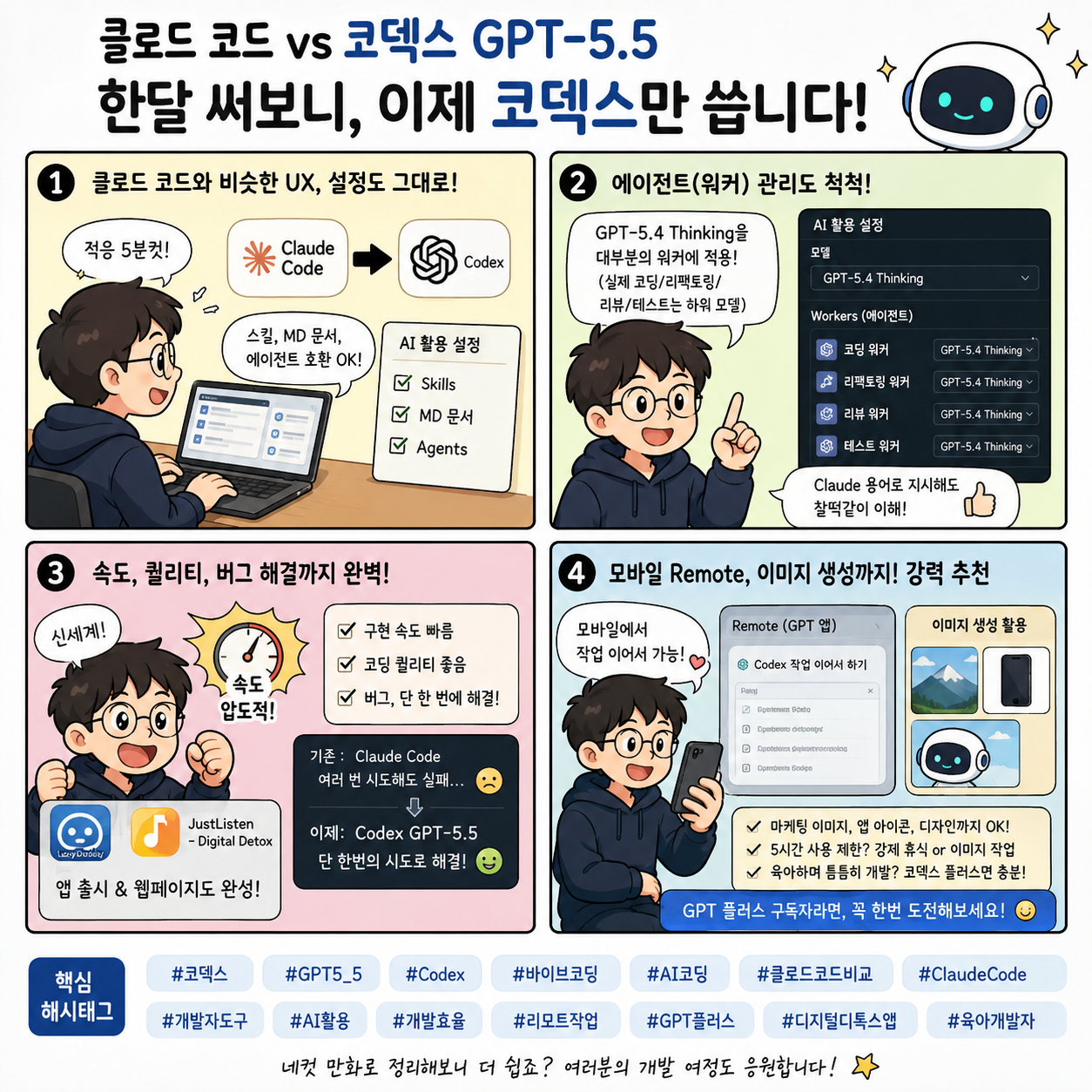
<p>그 글을 작성한 4월 초에 코덱스 5.5가 나왔지요. 비슷하게 클로드에서 Opus 4.7을 내놓기는 했으나, 토큰 소모량만 무지하게 늘어나며 앱 개발 측면에서는 Opus 4.6과 크게 비교가 안 되는 모델이었지요.</p>

<h2 id="claude-code에서-codex로">Claude Code에서 Codex로</h2>

<p>코덱스는 어떨지 궁금하기도 해서 가장 낮은 플랜인 Plus를 결제하고 코덱스를 설치했습니다.</p>

<p>저는 클로드도 클로드 코드 앱을 사용하고 있었는데요. 코덱스 UX도 무척 클로드 코드 앱과 비슷해 적응하는 데 5분도 채 걸리지 않았어요.</p>

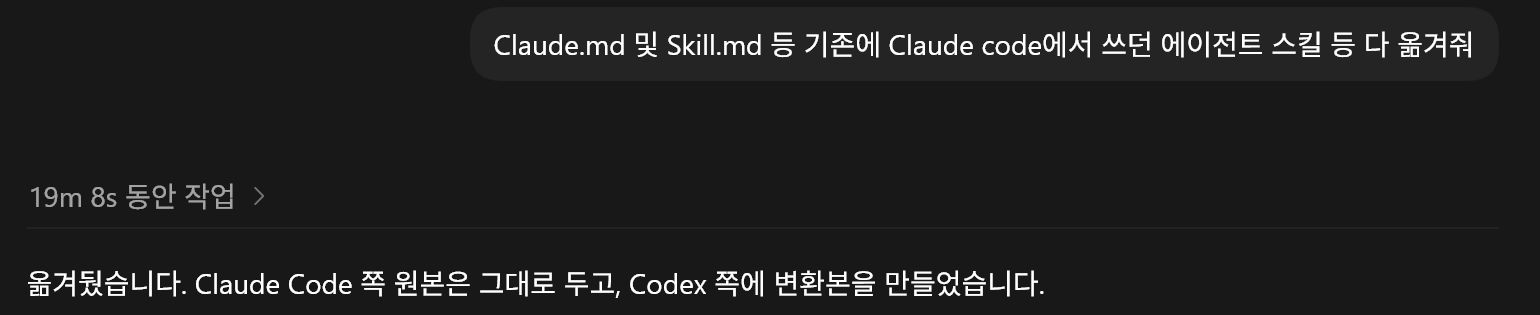
<p>당연히 지난 포스팅에서 설정해 두었던 스킬들, 각종 Markdown 문서들, 에이전트들도 코덱스에 호환됩니다. 저는 코덱스에게 시켰어요.</p>

<p><img src="/assets/images/posts/codex-claude-migration-prompt.png" alt="Claude Code의 설정과 에이전트를 Codex로 옮겨 달라고 요청한 프롬프트" /></p>

<p><em>기존 Claude Code 설정을 Codex에서 사용할 수 있도록 요청한 화면</em></p>

<p>그리고 프로젝트에 클로드 코드의 <code class="language-plaintext highlighter-rouge">CLAUDE.md</code>가 있으면 이 또한 코덱스에서도 읽을 수 있으나, 코덱스는 <code class="language-plaintext highlighter-rouge">AGENTS.md</code>를 따로 관리하고 있더라고요. 클로드의 에이전트라는 용어에 상응되는 워커라는 용어도 있었고요. 그래도 클로드 용어로 지시해도 찰떡같이 알아먹었습니다.</p>

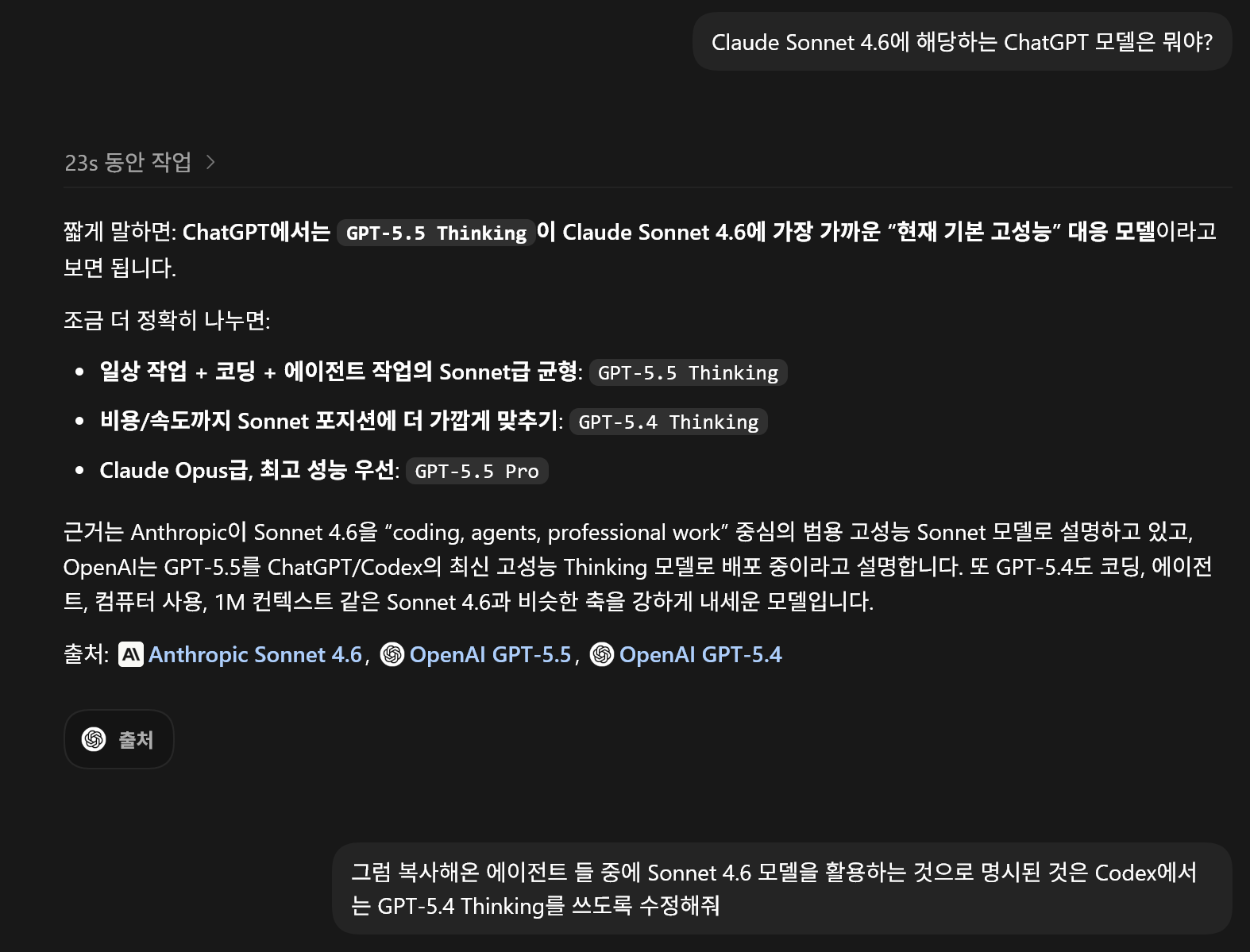
<p>클로드의 주요 모델인 Sonnet 4.6에 대응되는 모델을 찾는 것이 중요해서, 코덱스에 물어보고 GPT-5.4 Thinking 모델을 대부분의 에이전트(워커)에서 사용하도록 설정했습니다. GPT-5.5 모델을 항상 메인으로 사용하기 때문에 토큰 소모량 관리를 위해 실제 코딩, 리팩터링, 리뷰, 테스트 등을 작성하는 에이전트는 모두 하위 범용 모델을 사용하도록 했지요.</p>

<p><img src="/assets/images/posts/codex-worker-model-settings.png" alt="코딩과 리뷰 작업용 워커에 GPT-5.4 모델을 지정한 Codex 설정" /></p>

<p><em>코딩·리팩터링·리뷰·테스트 워커의 모델을 나눠 설정한 화면</em></p>

<h2 id="가장-놀란-건-속도">가장 놀란 건 속도</h2>

<p>가장 놀란 건 속도.</p>

<p>너무 빠르게 구현해 주는 게 신세계였습니다.</p>

<p>한 달 써보니 더 이상 클로드 코드로 돌아갈 수 없었습니다. 물론 회사 업무에는 아직도 클로드 코드를 써야 하긴 합니다만, 이제는 Visual Studio GitHub Copilot에서도 GPT-5.5 모델을 선택해서 씁니다.</p>

<p><strong>클로드 코드 대비 크게 단점은 없는 데다가, 속도도 빠르고 코딩 퀄리티도 괜찮고.</strong></p>

<p>예전에 프로젝트에서 클로드 코드가 계속 헤매면서 여러 번 재시도해도 해결하지 못하던 버그가 있었는데, 코덱스 GPT-5.5가 단 한 번의 시도만에 해결했습니다. 그 이후로는 개인 프로젝트를 코덱스 GPT-5.5만 사용해서 진행하고 있고요.</p>

<p>LazyDaddy, JustListen - Digital Detox 앱을 출시하고 웹페이지도 간단히 다 만들었습니다.</p>

<h2 id="모바일-remote와-이미지-생성">모바일 Remote와 이미지 생성</h2>

<p>게다가 <strong>GPT 모바일 앱의 Remote 기능으로 코덱스에서 작업한 것을 모바일에서 계속 확인하고 이어서 진행</strong>할 수 있어 너무 좋아요. 그전에는 구글 데스크톱 같은 것을 썼는데 많이 불편했거든요. 아직도 클로드 코드는 이 기능을 지원하지 않지 않나요?</p>

<p>클로드 코드를 쓸 때 너무 불편해서 앱을 하나 만들까 하는 생각도 들더라고요. 금방 지원할 것 같아 시도하지는 않았습니다만.</p>

<p><strong>또 다른 장점은 GPT의 이미지 기능</strong>이 마침 핫하게 올라와서 이걸 사용할 수 있다는 점이에요. 마케팅용 이미지 생성, 앱 아이콘, 디자인 등을 GPT 이미지로 해결했어요.</p>

<p>저처럼 육아하면서 틈틈이 개발하는 경우에는 코덱스 Plus 구독만으로도 전혀 부족하지 않네요. 5시간 사용량 제한에 걸리면 강제 휴식하거나 이미지를 만들면 되니까요.</p>

<p>GPT Plus를 구독하고 계신 분들은 한번 도전해 보세요.</p>

<p><img src="/assets/images/posts/codex-ai-coding-overview.png" alt="Codex의 특징과 시작 방법을 요약한 AI 코딩 안내 이미지" /></p>

<p><em>Codex를 활용한 AI 코딩의 특징과 시작 방법 요약</em></p>

<p>#코덱스 #Codex #GPT55 #GPT55코딩 #ChatGPT #ClaudeCode #클로드코드 #바이브코딩 #AI코딩 #AI개발 #개발생산성 #프로그래밍 #앱개발 #개인프로젝트 #GithubCopilot #GPT플러스 #AI활용 #개발도구 #생성형AI #코딩AI #개발자동화 #LazyDaddy #JustListen #개발자 #코딩팁</p>]]></content><author><name>LazyDaddy</name></author><category term="앱 개발" /><category term="코덱스" /><category term="Codex" /><category term="GPT55" /><category term="GPT55코딩" /><category term="ChatGPT" /><category term="ClaudeCode" /><category term="클로드코드" /><category term="바이브코딩" /><category term="AI코딩" /><category term="AI개발" /><category term="개발생산성" /><category term="프로그래밍" /><category term="앱개발" /><category term="개인프로젝트" /><category term="GitHubCopilot" /><category term="GPT플러스" /><category term="AI활용" /><category term="개발도구" /><category term="생성형AI" /><category term="코딩AI" /><category term="개발자동화" /><category term="LazyDaddy" /><category term="JustListen" /><category term="개발자" /><category term="코딩팁" /><summary type="html"><![CDATA[Claude Code에서 Codex로 개발 환경을 옮긴 뒤 느낀 속도, 워커 설정, GPT-5.5 문제 해결력과 모바일 Remote 기능을 정리했습니다.]]></summary><media:thumbnail xmlns:media="http://search.yahoo.com/mrss/" url="https://ocxeverywhere.github.io/assets/images/posts/codex-ai-coding-overview.png" /><media:content medium="image" url="https://ocxeverywhere.github.io/assets/images/posts/codex-ai-coding-overview.png" xmlns:media="http://search.yahoo.com/mrss/" /></entry><entry xml:lang="en"><title type="html">Multicultural Parenting: An Easier Way to Read Korean Storybooks Together</title><link href="https://ocxeverywhere.github.io/en/blog/posts/reading-korean-storybooks-in-multicultural-families/" rel="alternate" type="text/html" title="Multicultural Parenting: An Easier Way to Read Korean Storybooks Together" /><published>2026-06-30T21:21:00+03:00</published><updated>2026-07-12T12:00:00+03:00</updated><id>https://ocxeverywhere.github.io/en/blog/posts/reading-korean-storybooks-in-multicultural-families</id><content type="html" xml:base="https://ocxeverywhere.github.io/en/blog/posts/reading-korean-storybooks-in-multicultural-families/"><![CDATA[<p>As my children grow, I realize more and more how important reading time is. For multicultural families, however, it can bring an extra concern.</p>

<blockquote>
  <p>“I want to read Korean storybooks to my child, but I am not confident in my pronunciation.”</p>
</blockquote>

<p>Some families may have a different concern.</p>

<blockquote>
  <p>“Mom is Korean, but Dad would like to read with our child too—even though he does not know Korean well.”</p>
</blockquote>

<p>More families share these worries than you might expect. But now, things can be a little different.</p>

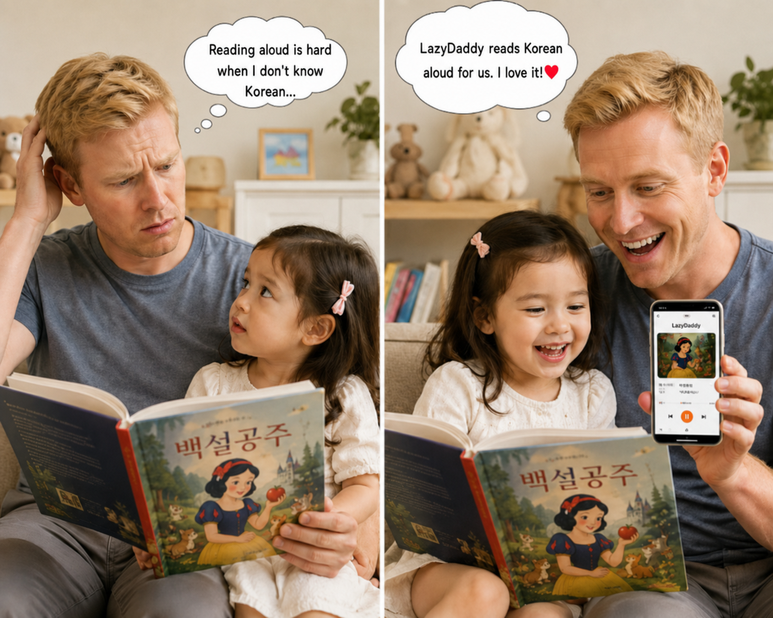
<p><img src="/assets/images/posts/lazydaddy-multicultural-korean-storybook-reading-en.png" alt="A parent and child reading together with English-localized speech bubbles" /></p>

<h2 id="let-the-app-help-with-the-korean">Let the App Help with the Korean</h2>

<p>Simply take a picture of a book page, and LazyDaddy reads the Korean sentences aloud naturally.</p>

<p>Dad can look at the illustrations and talk about the story with the child while the app handles the Korean reading. Even when family members speak different languages, they can still create meaningful reading time together.</p>

<p>I originally started building this app to make storybook time more fun for my own children. As I continued using it, I realized it could also be genuinely helpful for multicultural families.</p>

<p>Even if you do not know Korean well or feel unsure about your pronunciation, you can still spend time reading and laughing with your child.</p>

<h2 id="do-not-let-a-language-barrier-take-away-story-time">Do Not Let a Language Barrier Take Away Story Time</h2>

<p>Reading is not just about sounding out words. It is a chance to hear the same story, laugh together, and imagine together with your child.</p>

<p>I hope a language barrier never makes a family give up that time. 😊</p>

<p>If you know a parent who is not a native Korean speaker or is learning Korean, please share LazyDaddy with them. It could make Korean story time with their child much easier.</p>

<p>#MulticulturalFamily #KoreanStorybooks #LearnKorean #MulticulturalParenting #ParentingApp #ReadAloud #KoreanEducation #BilingualParenting #LanguageLearning #EarlyChildhoodEducation #ParentingTips #PictureBooks #LifeInKorea #LazyDaddy #AppRecommendation</p>]]></content><author><name>LazyDaddy</name></author><category term="LazyDaddy" /><category term="multicultural families" /><category term="Korean storybooks" /><category term="Korean learning" /><category term="parenting app" /><category term="reading aloud" /><category term="Korean education" /><category term="bilingual parenting" /><category term="early childhood education" /><category term="LazyDaddy" /><summary type="html"><![CDATA[Learn how parents in multicultural families can enjoy Korean storybooks with their children, even when Korean pronunciation or reading feels difficult, with help from LazyDaddy.]]></summary><media:thumbnail xmlns:media="http://search.yahoo.com/mrss/" url="https://ocxeverywhere.github.io/assets/images/posts/lazydaddy-multicultural-korean-storybook-reading-en.png" /><media:content medium="image" url="https://ocxeverywhere.github.io/assets/images/posts/lazydaddy-multicultural-korean-storybook-reading-en.png" xmlns:media="http://search.yahoo.com/mrss/" /></entry><entry xml:lang="ko"><title type="html">다문화 가정 육아, 한국어 동화책 읽기가 어려웠다면?</title><link href="https://ocxeverywhere.github.io/blog/posts/multicultural-family-korean-storybook-reading/" rel="alternate" type="text/html" title="다문화 가정 육아, 한국어 동화책 읽기가 어려웠다면?" /><published>2026-06-30T21:21:00+03:00</published><updated>2026-07-12T12:00:00+03:00</updated><id>https://ocxeverywhere.github.io/blog/posts/multicultural-family-korean-storybook-reading</id><content type="html" xml:base="https://ocxeverywhere.github.io/blog/posts/multicultural-family-korean-storybook-reading/"><![CDATA[<p>아이가 커갈수록 책 읽는 시간이 참 중요하다는 걸 느끼게 됩니다. 그런데 다문화 가정이라면 한 가지 고민이 생기죠.</p>

<blockquote>
  <p>“한국어 동화책을 읽어주고 싶은데… 발음이 자신이 없어요.”</p>
</blockquote>

<p>혹은 이런 고민도 있습니다.</p>

<blockquote>
  <p>“엄마는 한국인인데, 아빠도 함께 읽어주고 싶지만 한국어를 잘 몰라요.”</p>
</blockquote>

<p>생각보다 이런 고민을 하는 가족들이 정말 많더라고요. 하지만 이제는 조금 달라질 수 있습니다.</p>

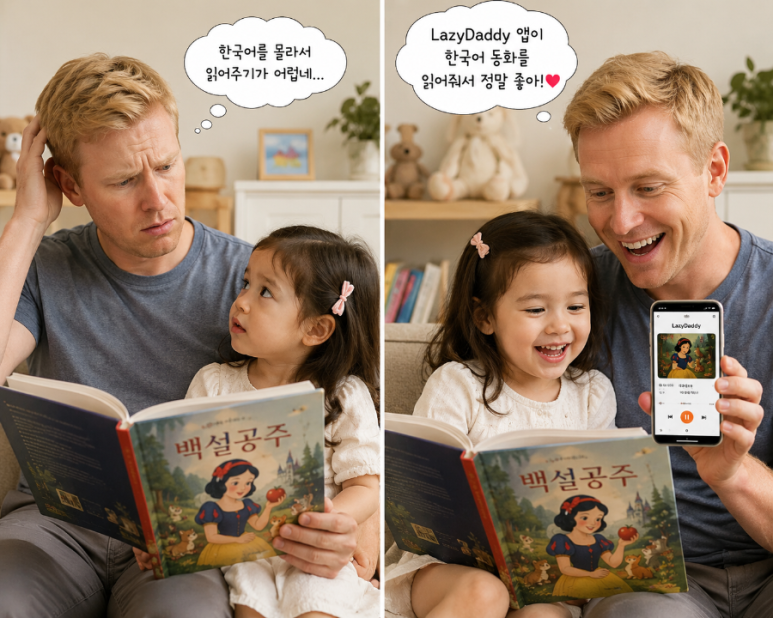
<p><img src="/assets/images/posts/lazydaddy-multicultural-korean-storybook-reading.png" alt="부모와 아이가 그림책을 함께 보며 LazyDaddy 앱으로 한국어 동화를 듣는 모습" /></p>

<h2 id="한국어-읽기는-앱이-도와줘요">한국어 읽기는 앱이 도와줘요</h2>

<p>책 페이지만 촬영하면 LazyDaddy가 한국어 문장을 자연스럽게 읽어줍니다.</p>

<p>아빠는 아이와 함께 그림을 보며 이야기해주고, 한국어 읽기는 앱이 도와주는 거죠. 덕분에 언어가 달라도 함께 책 읽는 시간을 만들 수 있습니다.</p>

<p>저는 원래 이 앱을 제 아이들에게 동화책을 재미있게 읽어주려고 만들기 시작했습니다. 사용하다 보니 오히려 다문화 가정에도 정말 도움이 되겠다는 생각이 들었습니다.</p>

<p>한국어를 잘 몰라도, 발음에 자신이 없어도 아이와 함께 책을 읽고 웃는 시간은 충분히 만들 수 있으니까요.</p>

<h2 id="언어의-장벽-때문에-포기하지-않기를">언어의 장벽 때문에 포기하지 않기를</h2>

<p>책을 읽는 건 단순히 글자를 읽는 것이 아니라 아이와 함께 같은 이야기를 듣고, 같이 웃고, 같이 상상하는 시간이라고 생각합니다.</p>

<p>언어의 장벽 때문에 그 시간을 포기하지 않았으면 좋겠습니다. 😊</p>

<p>혹시 주변에 외국인 아빠나 엄마, 또는 한국어를 배우는 부모님이 있다면 한 번 소개해 주세요. 아이와 함께하는 한국어 동화 시간이 훨씬 편해질 수 있습니다.</p>

<p>#다문화가정 #한국어동화 #한국어공부 #외국인아빠 #외국인엄마 #육아앱 #동화책읽기 #책읽어주기 #한국어교육 #이중언어 #언어교육 #유아교육 #육아꿀팁 #아이책읽기 #그림책 #한국생활 #육아일상 #LazyDaddy #레이지대디 #앱추천</p>]]></content><author><name>LazyDaddy</name></author><category term="LazyDaddy" /><category term="다문화가정" /><category term="한국어동화" /><category term="한국어공부" /><category term="외국인부모" /><category term="육아앱" /><category term="동화책읽기" /><category term="책읽어주기" /><category term="한국어교육" /><category term="이중언어" /><category term="유아교육" /><category term="LazyDaddy" /><summary type="html"><![CDATA[한국어 발음이나 읽기가 익숙하지 않은 다문화 가정 부모도 LazyDaddy와 함께 아이에게 한국어 동화책을 읽어줄 수 있는 방법을 소개합니다.]]></summary><media:thumbnail xmlns:media="http://search.yahoo.com/mrss/" url="https://ocxeverywhere.github.io/assets/images/posts/lazydaddy-multicultural-korean-storybook-reading.png" /><media:content medium="image" url="https://ocxeverywhere.github.io/assets/images/posts/lazydaddy-multicultural-korean-storybook-reading.png" xmlns:media="http://search.yahoo.com/mrss/" /></entry></feed>